
You must use the Button’s PID (Product ID) and VID (Vendor ID) to whitelist the ClickShare Button. The serial number printed on the Button label is not used by the USB interface and cannot be used for whitelisting.
The exact whitelisting procedure depends on your security software. Always check the documentation of your antivirus or security tool for the correct steps.
If your whitelisting system requires the logical USB serial number in addition to the PID and VID, the information in this article will help you.
Gen5 Button used with Hub Pro and Hub Core
The Gen5 Button is a USB composite device that exposes three USB interfaces.
- VID:
0x0600 - PIDs for the three interfaces:
0x0185,0x0186,0x01B5, 0x0184
Each PID corresponds to one USB interface:
- PID 0x0185 → Used for screen sharing (via the ClickShare App) and for Button updates over USB
- PID 0x0186 → Used for the RoomDock feature
- PID 0x01B5 → Present but not currently used in the field
- PID 0X0184 -> USB 2.0 BILLBOARD (this will trigger a popup message when a NON DP-ALT port is used)
Gen4.x Button used with C‑/CX-/CB-series
The ClickShare Gen4.x Button contains an internal USB hub that exposes two USB devices.
-
Hub VID/PID:
VID 0x05E3,PID 0x0610
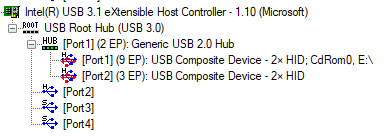
The Button USB configuration depends on:
- User settings (audio enabled/disabled), and
- Connected peripherals (camera, speakerphone). Each configuration has its own Serial Number. This design prevents conflicts with Windows’ cached device configurations (Windows uses serial to identify a device instance).
Examples
Port 1 (Presentation mode)
- Hardware ID (example):
USB\VID_0600&PID_00CE Product ID:USB\VID_0600&PID_00CE\3188790003- Logical serial format:
318879000x(where x varies by features).x = 1→ CD-ROM only. The Button starts as a flash drive and becomes read‑only CD‑ROM to resolve some Windows issues.x = 3→ CD‑ROM + speaker. In addition to the CDROM, the ClickShare speaker (TV or audio device) is exposed to the OS.
218879000x. From 2.10 and later, it uses318879000x
Port 2 (RoomDock mode)
The Button’s Port‑2 logical i‑serial number follows the format 37462100xx, where xx represents variable trailing digits. For example, in the shown case, the value is 3746210011
xx = 01→ Camera onlyxx = 02→ Speakerphone onlyxx = 03→ Camera + speakerphonexx = 10→ Speakerphone + speakerphone HIDxx = 11→ Camera + speakerphone + speakerphone HID
Whitelisting recommendations
-
The Gen4.x Button separates its functions across two logical ports: Port 1 provides basic functions, and Port 2 provides enhanced RoomDock features. For whitelisting, Barco advises using VID/PID pairs only and not adding the i‑serial number.
-
If your firewall/EDR requires the additional security, you can use the logical i-serial number. Barco recommended you include all permutations of the i-serial number; this reflects that the user may not know what functionality is in different rooms:
3188790001, 3188790003, 3746210001, 3746210002, 3746210003, 3746210010, 3746210011
(Include the older218879000xrange only if you still run pre‑2.10 firmware.)
Add the following path to the whitelist or execution list of the virus/security scanner running on the computer in order to allow the ClickShare Windows Driver automatically launching the ClickShare App, present on the button, when a button is plugged into the computer.
C:\Users\*\AppData\Local\Temp\{1F0A14E8-9535-4390-A660-EA5B9B5F32E3}\ClickShareButtonApp-*.exeFolders below should also be whitelisted :
%TEMP%\*
%TMP%\*
%USERPROFILE%\AppData\Local\Temp\*
Using the Button in very strict environments will require whitelisting of 2 Barco-signed DLLs libx264.dll and soxr.dll to be extracted to the location
C:\Users\*\AppData\Local\Temp\clickshare_xxxxxxxx, where xxxxxx represents a random number.
ClickShare Button used with CS(E)-series (CS‑100, CSE‑200, CSE‑200+, CSE‑800)
Since firmware 1.8.1, the logically embedded Serial Numbers (SN) are exposed as shown below. Depending on the capability of the Base Unit, Barco recommends including both logical serial numbers to the whitelist.
02.00.00.01.12.00.0000_0000→ Mass storage + audio02.00.00.01.12.00.0000_0001→ Mass storage only (no audio)- VID/PID (Buttons for CS(E) Base Units):
VID 0x0600PID 0x009F
ClickShare Button used with CSC / CSM‑1
For legacy CSM‑1/CSC‑1 with Button part number R9861006D01, use VID_0600 & PID_0070.
Related Articles
- Configure whitelisting for ClickShare Button via Local Group Policy Object (GPO) Windows Only
- Trend Micro flags the ClickShare Button as a threat
- ClickShare Button LED ring keeps spinning and never connects to the Base Unit when the RingCentral App is installed
- BitLocker popup when ClickShare Button is inserted
- Issues with whitelisting using a vendor-specific MAC-address in combination with the related vendor name

