
Recherche Barco

Notifications myBarco

Non lu

Lu

Vous n'avez aucune notification.
Produits

Does the ClickShare Extended Desktop Work on macOS?

Numéro d'article: [4305] - Code hérité: [1477]

Applicable à

The ClickShare Button and ClickShare Mobile App do not support creating a virtual second (extended) desktop on macOS. However, you can achieve this using AirPlay functionality of the macOS.

To create a virtual second desktop on macOS, use AirPlay to share your screen to a ClickShare device that supports AirPlay casting.

Steps to Create a Virtual Desktop using AirPlay with ClickShare?

  1. Share Screen via AirPlay: Use AirPlay to share your macOS screen to the ClickShare Base Unit.
    For detailed instructions on sharing a macOS device with ClickShare, see how-to: KB2890.
  2. Enable Extended Display: Select the Use As Extended Display option to use the ClickShare Base Unit as a virtual second display.
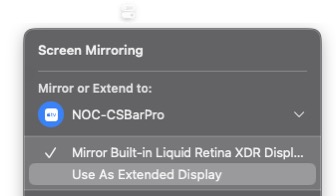
Note: If you encounter any issues with this setup, please refer to Apple AirPlay support for assistance 

Related Articles

Propriétés

Dernière mise à jour 7 sept. 2026

Aucune solution trouvée ?

Soumettre un ticket d'assistance

  • Technical questions
  • Return Material Authorization (RMA)
  • Status tracking of pending service requests
  • Consumable and spare parts orders

Barco AI assistant (Beta)

Our AI Assistant gives you immediate access to the full depth of our support knowledge—FAQs, detailed guides, and comprehensive PDF manuals.

Phone & email support

Our helpdesk provides you with prompt phone support. A team of experienced support engineers is at your service for any professional assistance.