
ClickShare operates in both the 2.4 GHz, 5 GHz and 6 GHz frequency bands. This dual-band capability provides flexibility in choosing the optimal wireless channel for your setup.
-
2.4 GHz band: It is often crowded because it is widely used by many devices
-
5 GHz band: It is the (default) recommended frequency band for ClickShare use. Select it for better performance and reduced interference.
-
6 GHz band: Available only on ClickShare Hub Core and Hub Pro models and is usually the best option for avoiding network congestion.
Some older laptops or PCs may not support 5 GHz Wi-Fi. Always verify device compatibility before switching bands.
How to minimize interference
To ensure optimal performance and reduce the risk of interference:
-
Use a Wi-Fi Scanner to find a free wireless channel
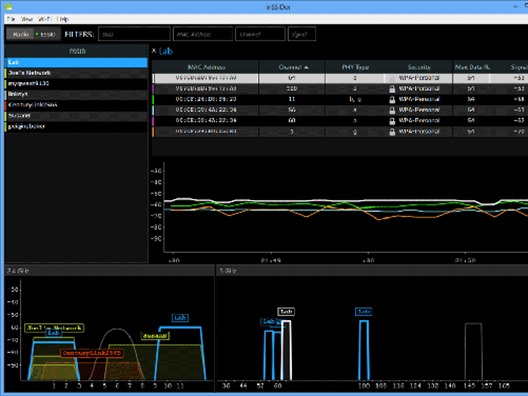
Tools like inSSIDer can help you visualize the wireless environment and identify the least congested channels.
-
Download from: https://www.metageek.com/products/inssider/.
You may need to create a free account. The tool provides you with a visual of the wireless environment as shown below in the image.
-
Please note inSSIDer does not detect a source of interference such as Bluetooth/ZigBee but only the Wi-Fi SSID.
-
-
Manually select a channel
Use the ClickShare Configurator (how-to, see KB2324) to manually assign a Wi-Fi channel:
-
CS, CSE, C, CX, CB series: Go to
Wi-Fi & Network > Wi-Fi Settings > Edit Settings -
CSC-1: Go to
Setup > Advanced
All services will use the selected Wi-Fi channel (ClickShare App, AirPlay, Googe Cast and Miracast - where applicable).
-
-
Re-pair Buttons after changes
-
After modifying Wi-Fi settings, re-pair all ClickShare Buttons with the Base Unit (how-to: see KB5924).
-
Video tutorial: Follow the video tutorial below for information on downloading the free Wi-Fi scanner, how to perform a Wi-Fi analysis, and some troubleshooting tips for Wi-Fi signal interference issues.
Note: Looking for information on the deployment of ClickShare within your corporate network.

