
This article may help you if you are having difficulty updating the firmware on your ClickShare Base Unit. There could be a number of possible reasons, some of which are listed below:
1. No Internet Connection or Unstable Network
A poor or unavailable network connection can interrupt firmware downloads.
Symptom
- Download fails, stalls, or times out.
Solution
- Verify that the device has internet access.
- Use a stable wired network connection whenever possible.
- If using Wi-Fi, ensure the signal strength is sufficient.
2. Base Unit in Deep Standby Mode
When the Base Unit goes in Deep Standby Mode, it will shut down all processes, including the Wi-Fi access point and LAN connection.
- Symptom
- No response during update
- Solution
- Restart the Base Unit
- Retry the firmware update after the device has fully booted.
3. Network Ports Blocked
If the process is failing to reach the update package online (i.e. during the automatic firmware update process), it might relate to not all required ports are open for downloading the firmware package.
- Symptom
- Update fails to downland
- Solution
Ensure all required ports are open. Refer to:- KB4130 for required ports settings information
- Network Guides for CX/C series and CS/CSE series
- Workaround
- Manually update the firmware on your ClickShare device using USB stick (how-to, see KB5923)
4. Firmware File Invalid or Corrupted Due to Download Issues
A corrupted or incorrect firmware package can cause manual firmware updates to fail.
- Symptom
- Manual firmware update fails
- Solution
5. Firmware Update Fails with XMS Edge in Offline Mode
When updating individual Base Units through XMS Edge operating in offline mode, the update may remain in an "In Progress" state and never complete.
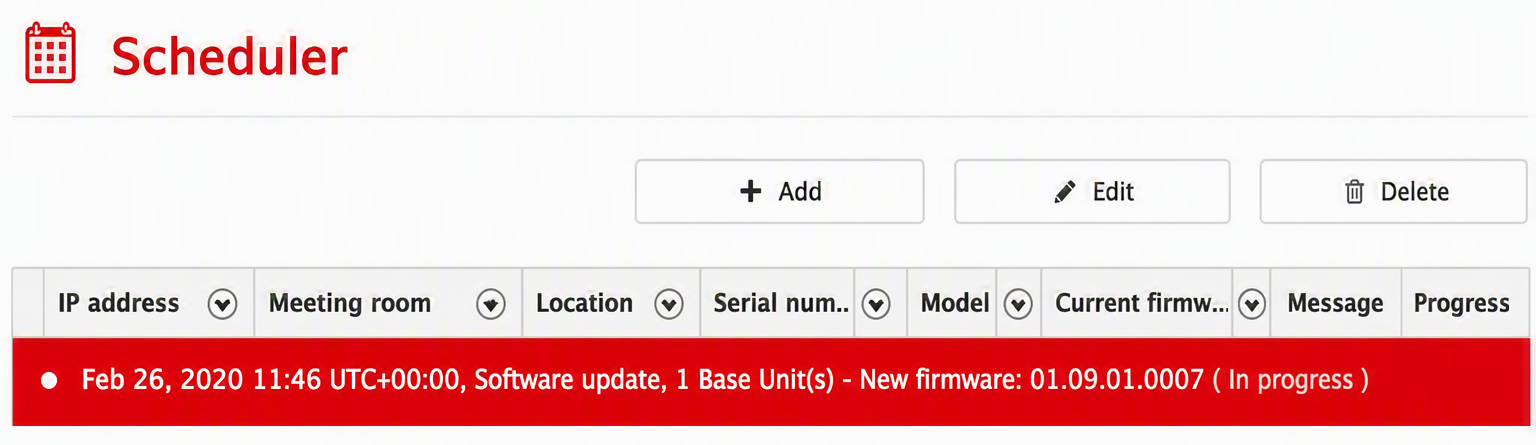
Cause
- This is a known issue with XMS Edge 2.1.1 operating in offline mode.
- The issue does not occur when using XMS (Virtual) Edge as a gateway to XMS Cloud.
Solution
- Use the latest XMS Edge version 2.3.0 or newer
See KB2400 for instructions on how to update XMS (Virtual) Edge) to update your Base Unit.
6. Cross Site Request Forgery (CSRF) Has Not Been Updated Correctly
An issue has been observed when upgrading the firmware of ClickShare CX-20/30 (Gen1 and Gen2) and Bar Core/Pro Base Units after downgrading from version 2.21.1. The firmware upgrade to version 2.22 or higher has the possibility of failing occasionally.
Cause
- The reason for this is that the CSRF has not been updated correctly.
Solution
- Please log out of the ClickShare Base Unit ClickShare Configurator (WebUI) and then
- Log back in to refresh the CSRF.
- Retry the firmware upgrade.
Contact Barco Support
If you still have difficulty updating firmware on the ClickShare device, please contact Barco helpdesk by creating a ticket (how-to, see KB6024).

