
Overview
In this full network integration mode, the ClickShare Base Unit is integrated into the corporate network or guest network via a cabled connection. The Base Unit's wireless access point is typically disabled and all traffic from the Button(s), the ClickShare App, Airplay, Google Cast and Miracast travels via the Enterprise network to the Base Unit. Employees and guests can share directly via the ClickShare Button or when connected with their mobile device to the same Enterprise network. Employees can also share using the ClickShare App (for guest users, a bridge is required between the guest and corporate network).
Note: The ClickShare Buttons are wirelessly connected via the corporate access points (APs) to the corporate LAN. All sharing traffic travels through the LAN to the Base Unit.
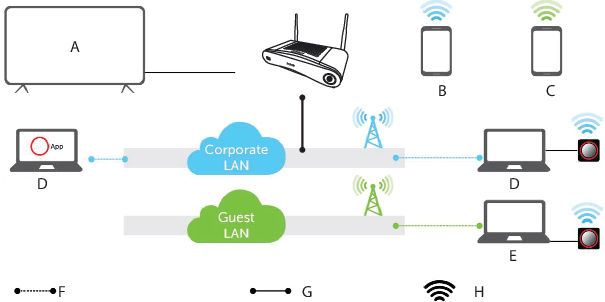
- A
- Meeting room screen
- B
- Employee mobile
- C
- Guest mobile
- D
- Employee laptop
- E
- Guest laptop
- F
- Wireless or Ethernet connection
- G
- Ethernet connection
- H
- Wireless connection
This setup is used for large Enterprise installations where ClickShare Units are integrated into a single corporate network, which is used for all devices.