5.1.8 Microsoft PowerPoint presenting

Availability
About Microsoft PowerPoint presenting

Microsoft PowerPoint presenting is a feature of Microsoft PowerPoint that makes use of multiple displays. The slides are shown on the display intended for the meeting attendees and an overview of the current slide, next slide and notes are shown on the display intended for the host. ClickShare can be used to fulfil the role of the slides display.

Prerequisites

The device must be connected to the ClickShare. For more information, see:

How to use
  1. Open the desired Microsoft PowerPoint presentation.

    Tip: It is possible to already start the presentation before setting up the sharing. However, Barco recommends to follow the procedure steps as described to minimize issues.
  2. Share the content using one of the following methods:
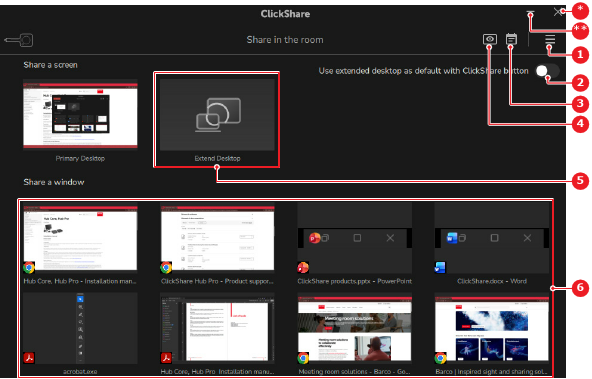
    • For window sharing using a wireless connection, click on the desired presentation in the window share options (reference 6). Go to next step
    • For extended desktop using a wireless connection, click on Extend Desktop (reference 5). Go to next step
    Image 5–11 Example of the Button App on Windows
    1
    Options menu
    2
    Default Button behavior toggle
    3
    Calendar integration menu
    4
    View meeting room display button
    5
    Extend desktop option
    6
    Window share options
    *
    Close button
    **
    Minimize window button
  3. Start the presentation in Microsoft PowerPoint.
  4. Is the presenter view visible on the device display and the slides on the meeting room displays?

    • If yes, no further actions required.
    • If no and the slides are on both the device display and the meeting room displays, right click the slides and select Show Presenter View.
    • If no and the slides are on the device display, swap the displays in the presenter view.