Availability
- Operating system: Windows and MacOS
- Base Unit: CX-20, CX-30, CX-50, CX-20 Gen2, CX-30 Gen2, CX-M, CX-50 Gen2, CB Core and CB Pro
- Room feature: 4th gen Button (optional)

Calendar integration  syncs any planned meetings from the Microsoft Outlook calendar with the Desktop App. The calendar of any email address logged into the Microsoft Outlook client can be detected. For more information on the email client, see the documentation of Microsoft Outlook.
One click join allows the ClickShare App to resolve a conferencing app invite from an upcoming meeting within the ClickShare App.
Calendar integration must be enabled in the ClickShare App settings. For more information, see “Calendar integration”.

Is the meeting happening in a ClickShare enabled meeting room?
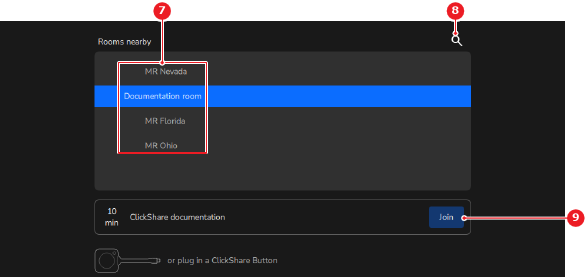
Must the meeting be joined immediately?

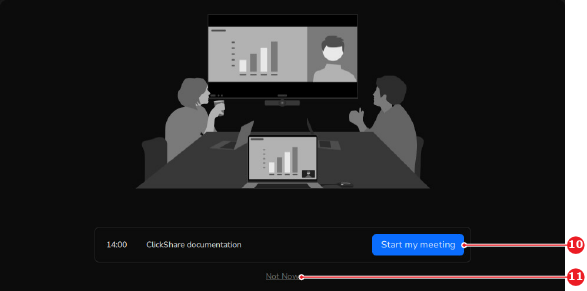
Open the calendar integration menu (reference 3) when the conference meeting must be joined.

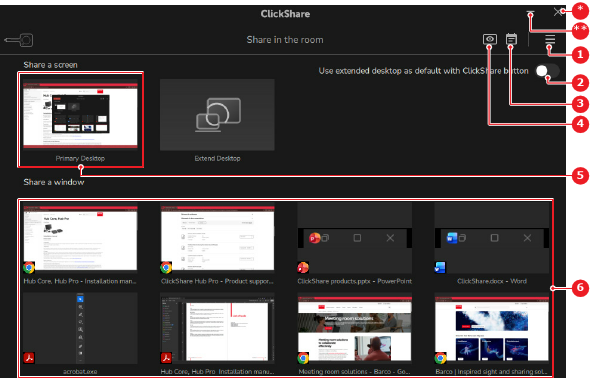
The calendar integration menu is opened
Click (reference 12) for the meeting in the calendar integration menu.
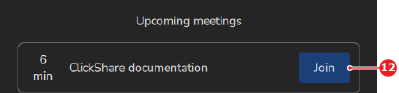
Use the ClickShare App features for local sharing from one of the following methods:
 notification icon is shown on the calendar integration menu.