3.3.4 Calendar integration

About calendar integration

Calendar integration syncs any planned meetings from the Microsoft Outlook calendar with the Desktop App. The calendar of any email address logged into the Microsoft Outlook client can be detected. For more information on the email client, see the documentation of Microsoft Outlook.

Location

Options () > Settings

How to toggle
  1. Must calendar integration be used?

    • If yes, enable the slider after Calendar Integration (reference 1).
    • If no, disable the slider after Calendar Integration (reference 1).
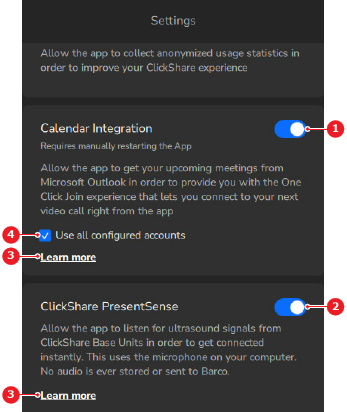
    Image 3–9
    1
    Calendar integration toggle
    2
    PresentSense toggle
    3
    More information link
    4
    All accounts check box
  2. Must the calendar of all Microsoft Outlook accounts be linked?

    • If yes, check the check box in front of Use all configured accounts (reference 4, Image 3–9).
    • If no, uncheck the check box in front of Use all configured accounts (reference 4, Image 3–9).
  3. Restart the Desktop App. For more information, see “Quit”.
  4. Use one click join to take advantage of the calendar integration. For more information, see: