5.2.3 Installing the Control Panel on a flat surface (round base)

About the round base

A round base is included in the box of each Control Panel. This round base provides additional support to the Control Panel while it is positioned upright. A rubber ring has been added at the bottom to minimize damage to the surface.
Prerequisites

A ‘USB-C’ cable must be connected to the Control Panel. For more information, see “Connecting the USB cable”.

Required tools

Phillips screwdriver PH2

Required parts
How to install
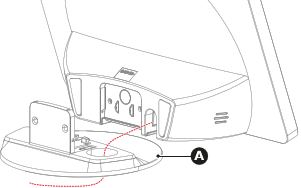
  1. Route the ‘USB-C’ cable through the cutout of the round base (reference A) as illustrated.

    Image 5–8
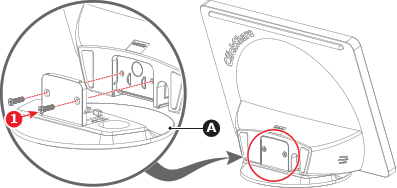
  2. Secure the round base (reference A) to the Control Panel with two M3 screws (reference 1). Use a PH2 Phillips screwdriver.

    Image 5–9
  3. Position the Control Panel in the desired location.
  4. Connect the Control Panel to the Base Unit. For more information, see “Control Panel connection”.