5.5.5 Control Panel connection

Prerequisites

The Control Panel ‘USB-C’ cable must be installed before the connection to the Base Unit can be made. For more information, see “Control Panel installation”.

How to connect
  1. Is the Control Panel being used with the Barco ‘USB-C’ cable?

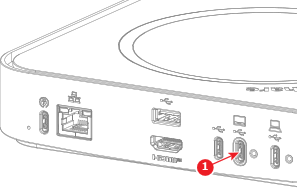
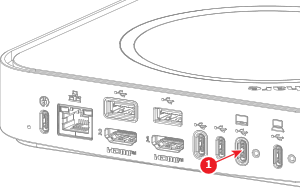
    • If yes, connect the ‘Source’ side of the ‘USB-C’ to the ‘USB-C’ port (reference 1).
    • If no, connect the ‘USB-C’ to the ‘USB-C’ port (reference 1).
    Tip: Secure the ‘USB-C’ cable to the‘ USB-C’ port with the USB-C cable lock. For more information, see “Securing the USB-C cables to the Base Unit”.
    Image 5–58 For Hub Core
    Image 5–59 For Hub Pro
  2. Configure the orientation of the Control Panel in the ClickShare settings app. For more information, “Control Panel settings”.