Prerequisites
A ‘USB-C’ cable must be connected to the Control Panel. For more information, see “Connecting the USB cable”.

A ‘USB-C’ cable must be connected to the Control Panel. For more information, see “Connecting the USB cable”.
Phillips screwdriver PH2
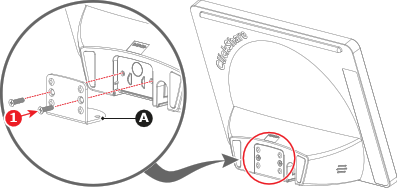
Secure the L-shape plate (reference A) to the Control Panel with two M3 screws (reference 1). Use a PH2 Phillips screwdriver.
Which orientation must the Control Panel be used?
Connect the Control Panel to the Base Unit. For more information, see: