5.2.6 Securing the Control Panel to the wall

About wall location

The Control Panel uses a proximity sensor to detect when people enter or leave the meeting room. This sensor is designed to work with direct line of sight. Barco recommends installing the Control Panel at a height of 135 cm near the entrance of the meeting room.
Prerequisites

A ‘USB-C’ cable must be connected to the Control Panel. For more information, see “Connecting the USB cable”.

Required tools

Phillips screwdriver PH2

Required parts
How to secure
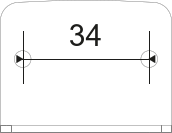
  1. Foresee two holes spaced 34 mm apart at the desired location.

    Image 5–16
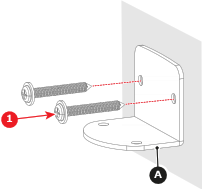
  2. Install the L-shape plate (reference A) using two screws (reference 1) in the prepared holes. Provide two M4 screws, each at least 25.4 mm long.

    Image 5–17
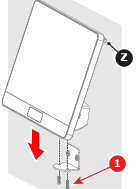
  3. Install the Control Panel with two M3 screws (reference 2). Use a PH2 Phillips screwdriver.

    Note: Ensure the rubber strip (Z) makes contact with the surface.
    Image 5–18
  4. Connect the Control Panel to the Base Unit. For more information, see “Control Panel connection”.