Prerequisites
A ‘USB-C’ cable must be connected to the Control Panel. For more information, see “Connecting the USB cable”.

A ‘USB-C’ cable must be connected to the Control Panel. For more information, see “Connecting the USB cable”.
Phillips screwdriver PH2
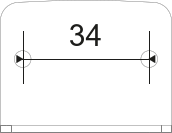
Prepare two holes spaced 34 mm apart at the desired location.
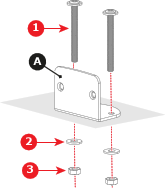
Install the L-shape plate (reference A) using two M4 screws (reference 1), two washers (reference 2) and two nuts (reference 3) in the prepared holes. Use a PH2 Phillips screwdriver.
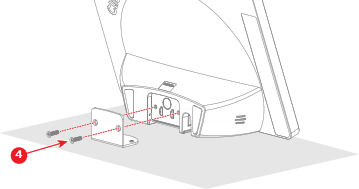
Install the Control Panel as illustrated using two M3 screws (reference 4). Use a PH2 Phillips screwdriver.
Connect the Control Panel to the Base Unit. For more information, see: