
Introduction
Our displays are designed to deliver a seamless, all-in-one connectivity experience through a single USB-C cable. This cable enables video, audio, Ethernet, USB data, and charging—making your workspace cleaner and more efficient. To ensure optimal performance and reliability, it's essential to use the USB-C cable that was supplied with your product.
Why the Supplied Cable Matters
1. Power Delivery (Charging Capabilities)
One of the most critical reasons to use the original cable is its power delivery capabilities. Our displays support up to 100W (20V, 5A) of charging power via USB-C1, which is sufficient to power most laptops and devices. Not all USB-C cables are created equal—many third-party cables are limited to 60W or even less, which can result in:
- Slow charging
- No charging at all
- Unexpected disconnections
- Device overheating or throttling
The supplied cable is specifically rated and tested to handle the full 100W safely and consistently.
1 Specifications may vary per display model. For accurate specifications for your display model, please consult the specification sheet on the Barco website.
2. Data Throughput and Feature Support
Beyond charging, the cable also supports:
- High-resolution video and audio transmission
- Gigabit Ethernet
- USB 3.x data speeds for connected peripherals
Using a lower-quality or incompatible cable may lead to:
- No video at all
- Reduced video resolution or refresh rate
- Loss of Ethernet connectivity
- Peripheral devices not being recognized
- Intermittent connection issues
Our cable is engineered to support all these features simultaneously, ensuring a smooth and reliable user experience.
3. Product Safety and EMC Compliance
The supplied USB-C cable is part of the product’s certified system, tested to meet EMC (Electromagnetic Compatibility) and safety standards. Using uncertified or lower-grade cables can:
- Introduce electrical noise or interference, affecting nearby devices
- Compromise the display’s compliance with regulatory standards
- Increase the risk of overheating or electrical faults
To maintain the integrity of the product’s safety certifications and ensure safe operation, always use the original cable or an approved replacement.
How to Identify the Official USB-C Cable
Each official USB-C cable supplied with our displays includes a label attached near one of the connectors. This label contains the Barco part number, which confirms the cable’s authenticity and compatibility.
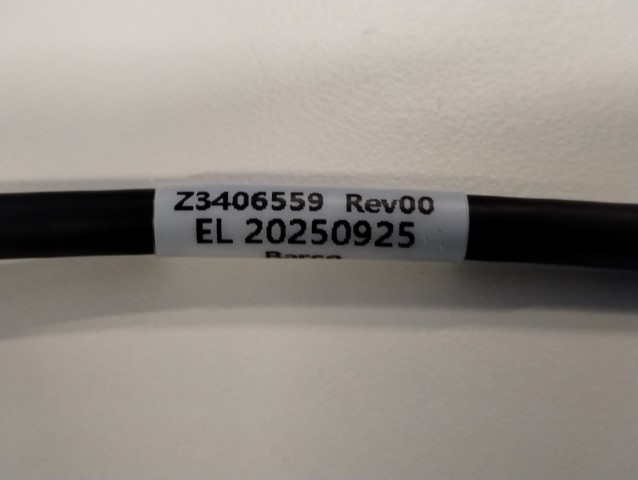
When checking your cable:
- Look for a small white or black tag near the connector.
- The tag should clearly show the Barco part number (Z3406559).
- If the label is missing or unreadable, we recommend replacing the cable to ensure continued performance and safety.
Need a Replacement? Here's Where to Find It
If your original cable is lost or damaged, we recommend purchasing the official spare part kit to guarantee compatibility and performance.
To order a replacement cable:
- Visit our Service Portal
- Create a new case of the type "Spare parts sale". If you do not know how to do this, follow this knowledge base article to learn all about it.
- Write in the case description that you would like to order the following part number: C9827270 (this kit contains two cables)
- You will get a quote and further instructions on how to order.

