
A factory reset can help resolve persistent issues or prepare a ClickShare Hub device for redeployment. This process restores the device to its original out-of-box state, removing all user data, configurations, and updates.
Before You Begin
- Backup any necessary data (e.g., logs or configuration files).
- Disconnect from the network if you want to prevent automatic updates or provisioning during reset.
- Prepare re-installation credentials: You will need a valid Microsoft Teams Room license & password if you intend to immediately re-install the unit.
Method 1: Reset using the local access on the ClickShare Control Panel
- Access the Settings Menu:
- From the Teams Rooms interface, tap the gear icon.
- Go to Device Settings.
- Go to Admin settings and enter the admin password if prompted.
- Navigate to System Settings:
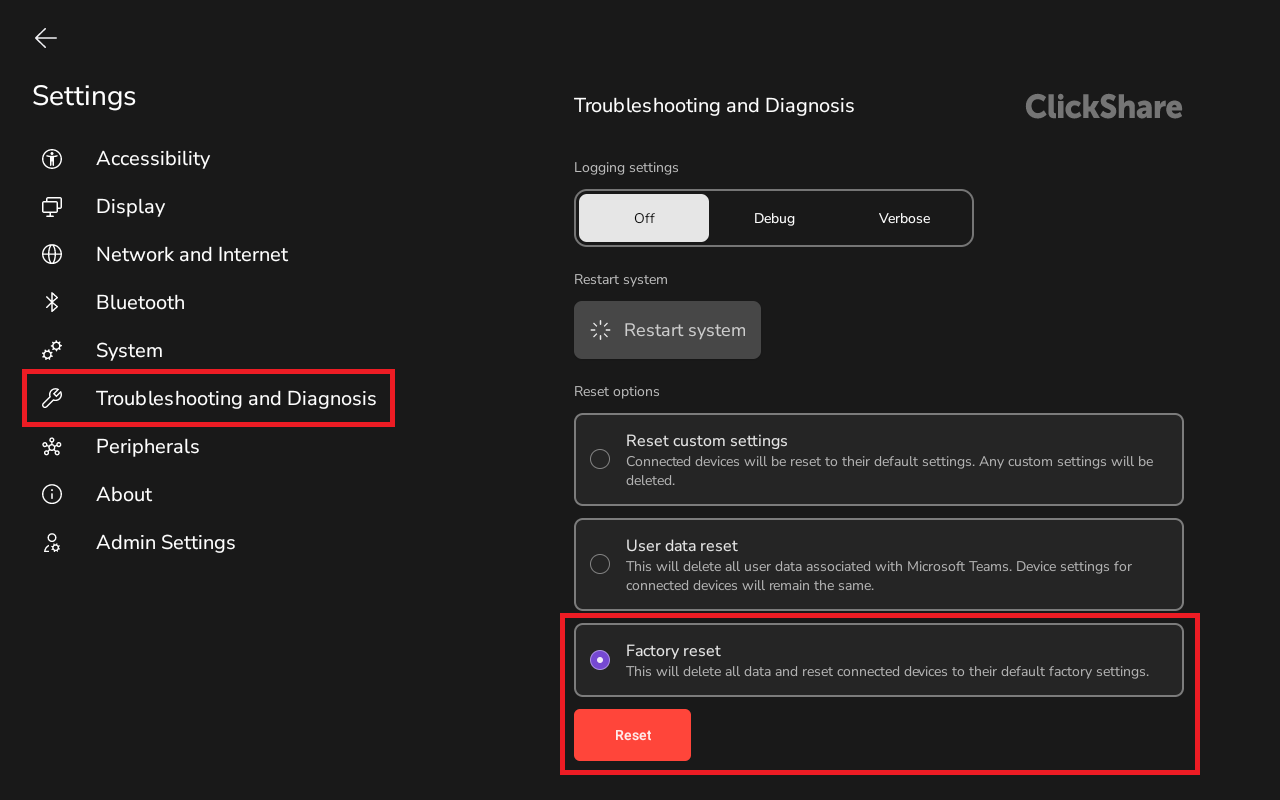
- Once logged in to the admin settings go to Troubleshooting and Diagnosis.
- Initiate Factory Reset:
- Select complete a full factory reset select Factory reset in the Reset options section at the bottom.
- Confirm the action by pressing the Red highlighted Reset button at the bottom of the Reset options section.
Method 2: Hardware Button Reset
If the device is unresponsive or locked:
- Disconnect power
- Power off the device and unplug the power cable from the device.
- Locate and press the reset button
- Use a small paperclip to press and hold the reset button (reference 1).
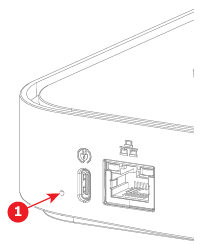
- Use a small paperclip to press and hold the reset button (reference 1).
- Power On while holding the button
- While continuing to press the reset button, reconnect the power cable to the device.
- Wait for confirmation
- Keep holding the reset button until the spinning circle appears on the ClickShare Control Panel.
- Release and reboot
- Release the reset button.
- The device will automatically reboot.
Post-Reset Steps
After the reset:
- Reconnect to the network.
- Reconfigure regional settings (language, time zone).
- Sign in with the Teams resource account.
- Apply any required updates or provisioning profiles.
Video Tutorial
Watch the video below for step-by-step instructions to factory reset the ClickShare Hub device to its default settings for troubleshooting or reconfiguration.
Troubleshooting
- If the reset fails, try using a different method.
- Ensure the device has sufficient power and is not overheating.

