
Overview
Starting from Windows 11 version 24H2, Microsoft introduced enhanced privacy controls for the Location Service, which includes access to Wi-Fi data. Whenever an application accesses location-related info, Windows shows an indicator in the taskbar to let you know the Location Service is in use.
If you're using the ClickShare Desktop App, you might notice this indicator frequently. 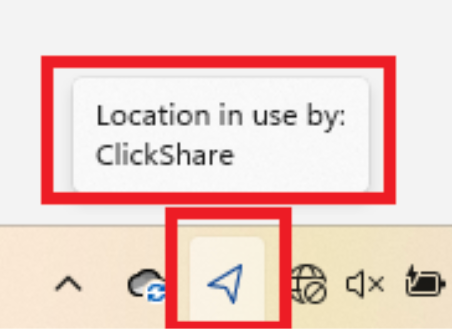
Why Does ClickShare Desktop App Use the Location Service?
-
The ClickShare Desktop App periodically performs Wi-Fi scans to detect nearby devices. This helps users quickly see available devices when they open the app, without waiting for a manual refresh.
-
Windows 11 version 24H2 considers accessing Wi-Fi info as using the Location Service. So, every time the app scans (approximately every 30 seconds), Windows shows the location indicator, even though the app isn't using GPS or physical location data.
-
This frequent background scanning can make the indicator appear often, which can be distracting to some users.
Workarounds:
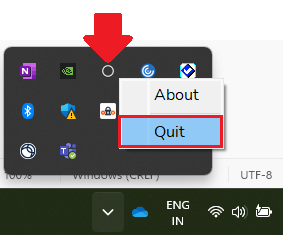
- Close the ClickShare Desktop App: If you don't want the indicator to appear when you're not using the app, simply quit the app from the taskbar.
- Deploy ClickShare Desktop App MSI: IT administrators can deploy the ClickShare Desktop App MSI with the parameter "USER_EXP" set to either "BB" or "SB" (how-to, see KB3329) to avoid using Location Services for device discovery. Please note, this is only applicable when using the ClickShare Button.

