
Indietro
NMS 2
Non riceverai avvisi per i prodotti selezionati.
Vai a Impostazioni del tipo di avviso per modificare le preferenze di notifica.
Nexxis 2 Management Suite
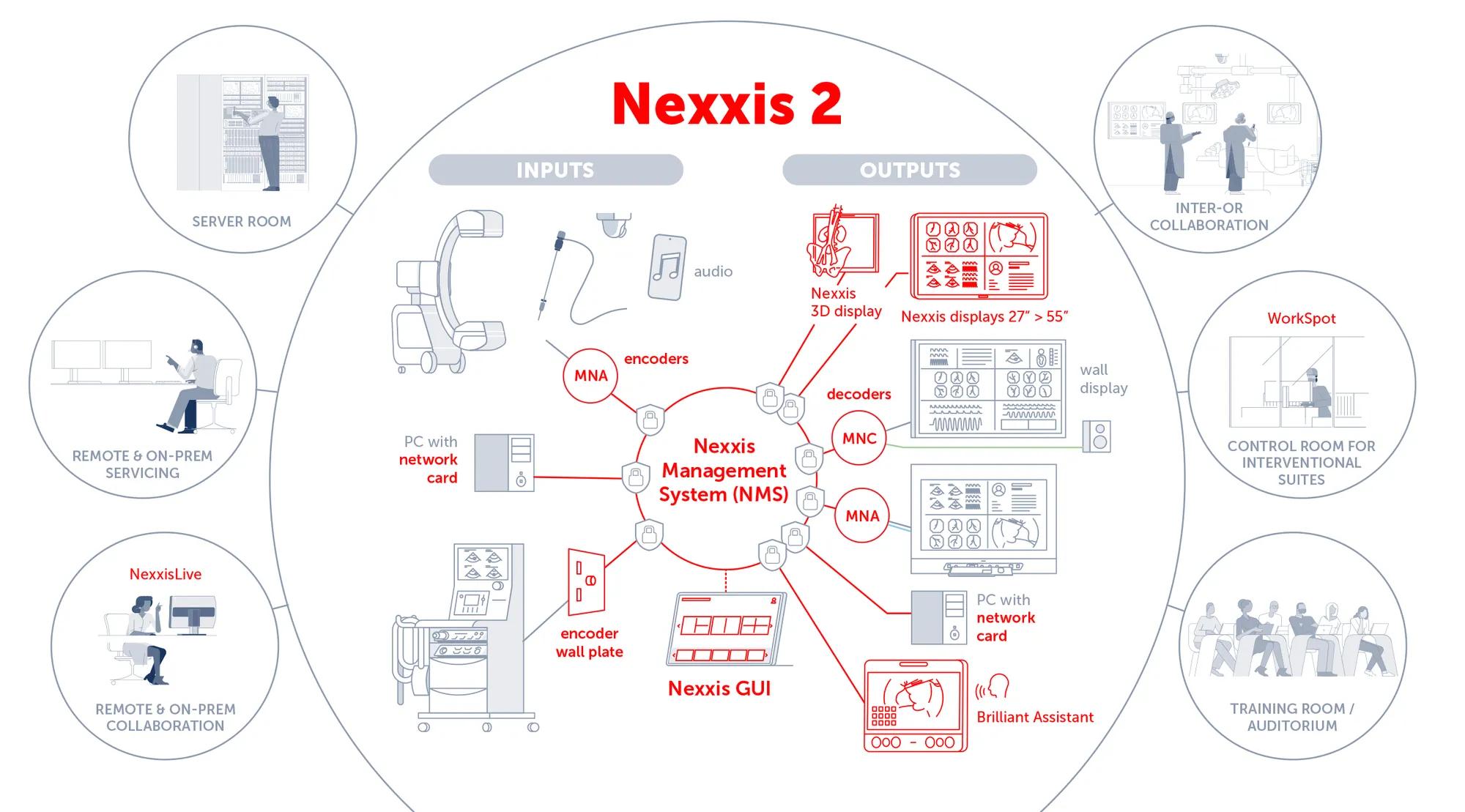
The NMS 2 software is the cornerstone of Barco's networked visualization solution for the digital operating, endoscopy and interventional rooms. This management suite sets up, manages and monitors the AV-over-IP streams between the MNA encoders and decoders and facilitates configuration and management. Integrated within the user interface of the operating room integrators, the software allows distribution of high-quality video, audio, keyboard, mouse and touch towards any destination with a single touch on the screen.
Rapid application development
Barco's NMS 2 software offers a user-friendly interface to help operating room integrators build their own application to control and manage displays and sources. All network complexity is hidden for the integrator, which allows for a highly intuitive environment to manage sources and destinations. Dynamic thumbnails, friendly names, overlays, PiP, PaP, QuadView, and display layouts are just a few of the many features that are directly available at the API.
Benefits of the Nexxis 2 solution
- Secure by design
- Medical device compliance
- Uncompromised image quality
- Reliable, future-ready and designed to scale
- Plug-and-play of Nexxis encoders and decoders
- Seamless integration and clean installation to reduce hardware footprint, complexity and maintenance
- Auto-detection and easy identification of sources and destinations
- Easy-to-install application
- Dedicated solutions for specific needs
- Share full quality video and audio between rooms in the hospital
- Ready for AI-assisted workflows
- Intuitive end-user Nexxis UI
- Fully featured API for integration
- Service web interface for device management and diagnostics
Specifiche
Scarica la scheda tecnicaSpecifiche generali
- Supported devices
- MNA-420
MNA-440 (including Nexxis displays)
MNA-240
MNA-140 PCIe
MNA-180 PCIe
- Connectivity
- Plug-and-play of supported Nexxis devices
Automatic detection of video sinks and sources
Automatic detection of audio sinks and sources
Automatic detection of Keyboard, mouse and touch (KMT) devices
Automatic detection of GPIO devices
Automatic detection of RS232 devices
- Video routing
- Up to uncompressed 4K@60 4:4:4 10bit
AES 128 encrypted
Automatic or manual color profile selection
Sub-frame near-zero latency for critical source when genlocked
Any-to-any video routing
Thumbnails for easy source identification
Friendly names for easy source and display identification
Full quality snapshots
- 3D video routing
- Automatic 3D mode selection
Side-by-side, line-interleaved, top-and-bottom, dual stream and SDI Level B-DS
- Video layouts
- Preloaded layouts: full, PIP, PAP, quad, 1+2, 1+3, 2x4, 2x3, 1+4, 3+2 and 4+2
Easy custom layout creation through API or UI
- Mirroring
- Mirroring a source horizontally and/or vertically
- Zoom & Crop
- Automatic black border removal
Zoom in on an area of interest
- Static video overlays
- Overlay text, images, shapes and a timer on top of video content
Custom styling and formatting
Context parameters introduce dynamic behavior for text overlays
- Preset management
- Apply layout, routing, static overlay and KMT properties to a display with a single action
Easy custom preset definition through API or UI
- Composition Streamback (Network composition)
- Simultaneous decoding and network composition
Display content becomes a new Nexxis source
Including thumbnail, friendly name and snapshot functionality
- Dynamic video overlays
- Video blending (color keying): make a color of a source transparent
- Display integration
- Nexxis 2D and 3D displays with integrated decoding capabilities
Various sizes and panel technologies to accommodate specific needs
Seamless integration and clean installation
Easy FW update
Failover functionality
- Audio routing
- Uncompressed audio streaming
AES 128 encrypted
Gain and volume control
Any-to-any audio routing
Audio mixing of multiple sources
- Data routing
- AES 128 encrypted
KMT support
KMT Splitting: configure K, M and T streams separately
RS232 serial control
GPIO triggers
Events management
- WorkSpot
- Manage multiple applications with a single K&M on a single display
On-screen UI for easy source, layout and preset selection
Typically used in interventional control rooms
- Inter-OR sharing
- Share uncompressed audio and video between rooms
Choose downscaled or full resolution
Fine-grained bandwidth control tools
- Management
- NMS 2 software for Windows & Linux
Fully featured API for integration
Nexxis UI: Intuitive end-user GUI with basic functionality
“Demonstrator” web interface to try out Nexxis capabilities
Service “Troubleshooter” web interface for device management, diagnostics and licensing
Persistent logging
Cerchi documenti tecnici o assistenza sui prodotti?
Per download tecnici come driver, firmware, manuali, disegni e documentazione, ti reindirizziamo alla nostra pagina di assistenza prodotto.
Vai all'assistenza del prodotto