Ricerca Barco

Notifiche myBarco

Non letto

Letto

Non hai alcuna notifica.

How to bulk register multiple ClickShare C/CX Base Units using device tokens?

Codice articolo: [2287] - Codice legacy: [11243]

Applicabile a

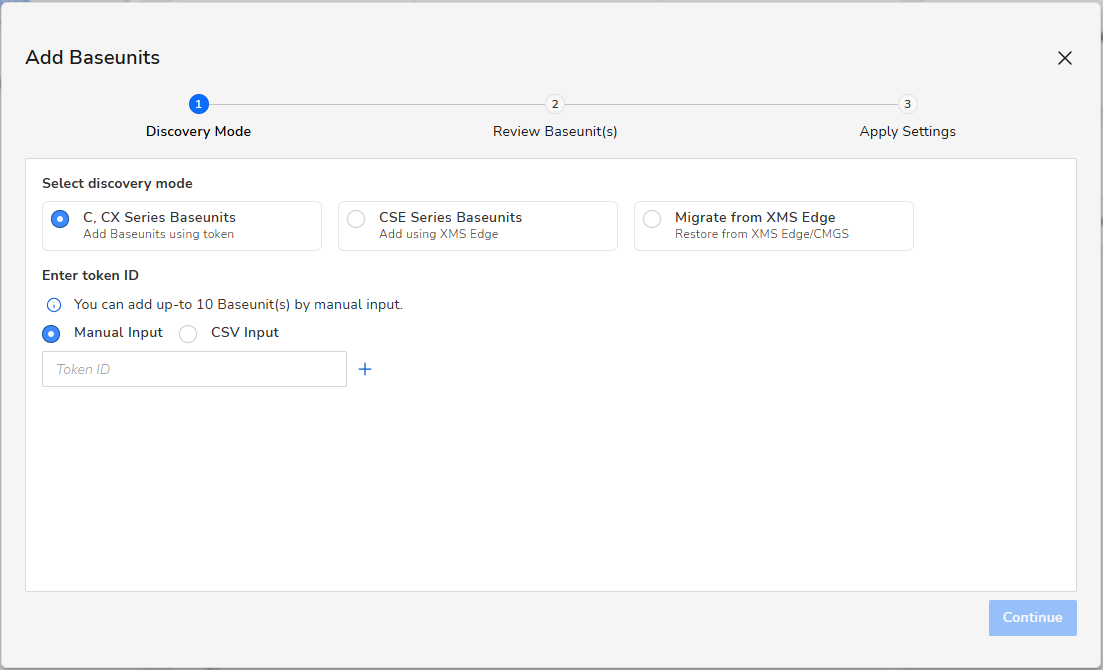
This article provides instructions on how to bulk-register ClickShare C-series and CX-series Base Units to the XMS Cloud using device tokens.


Notes:

  • The following information is applicable only to ClickShare Base Units (C-series and CX-series) running firmware version 2.17 and below.
  • For ClickShare C-series, CX-series and Bar Core/Pro running firmware version 2.18 and above.
    • No Bulk registrations methods are available
    • Devices can be registered individually using:
      • Registration via scanning QR code, see KB15557
      • Registration via clicking on Registration link, see KB10810
  • This information is not applicable to ClickShare Hub Core and Hub Pro.


Methods for bulk registration

You can register multiple ClickShare Base Units using two methods:

  1. Manual Input
  2. CSV Input


Detailed instructions

🔗For the most up-to-date and detailed instructions, please refer to the chapter How to add C or CX series Base Units using device token in the XMS Cloud User guide.


Related Articles

Download

Proprietà

Ultimo aggiornamento 7 set 2026

Non è stata trovata una soluzione?

Apri un ticket di supporto

  • Technical questions
  • Return Material Authorization (RMA)
  • Status tracking of pending service requests
  • Consumable and spare parts orders

Barco AI assistant (Beta)

Our AI Assistant gives you immediate access to the full depth of our support knowledge—FAQs, detailed guides, and comprehensive PDF manuals.