6.21 Programming Menu

General

The programming page is where the event is set up and everything comes together. Users can define sources from inputs, place layers and backgrounds into screens, and create User keys, presets, and more. Once programmed and defined this is where the show is played back as well.
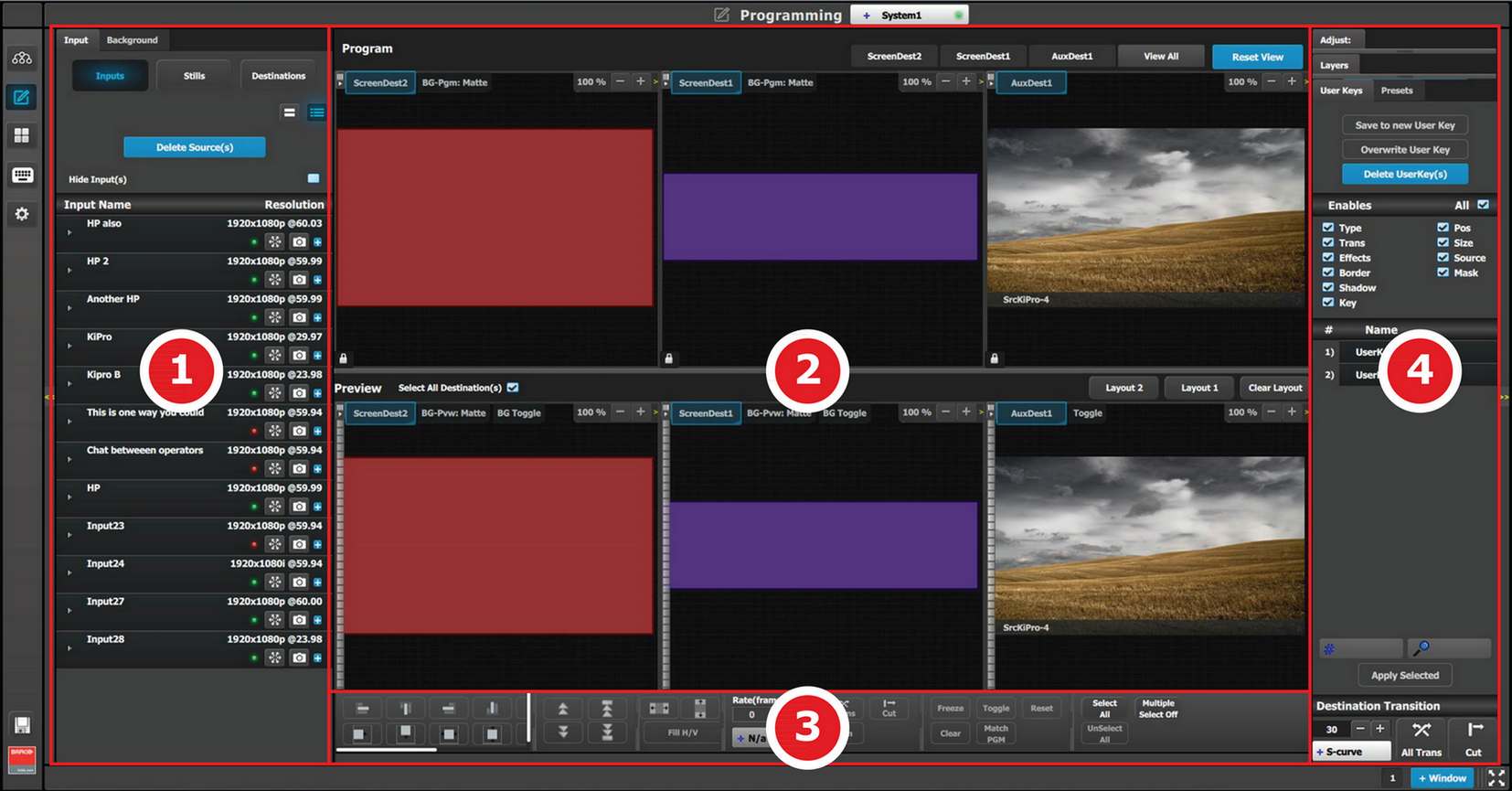
Description
Image 6–63 Programming Menu Overview
1Resources areaThis area contains the available resources for programming and playback, as inputs and sources. Still images, Screen Destinations (automatically re-inserted into the system), and Background sources (automatically re-inserted into the system) are also available as resources to be used in a PIP or Keying Layer.
2Workspace / Programming Diagram area

For each destination, super destination, or destination group, the Program and Preview screens can be viewed individually by selecting the corresponding tab at the top of the Programming Diagram area. Program and Preview screens can be viewed individually or simultaneously by selecting the individual Destination tab or the “View All” tab.

The space between Program and Preview has Layouts, a function where a certain group of destinations can be laid out in the workspace

3Workspace / Layer modification areaLayer Alignment adjustments and controls to manage the Preview/Program screens.
4Adjustment areaThe menus in this area provide control of parameters for selected layer and source. These can be modified and managed. This is where creation of User Keys and presets is done

The following sections describe each part of the Programming page in detail: