6.19 Programming Menu

General

The programming page is where the event is set up and everything comes together. Users can define sources from inputs, assign layers and backgrounds into screens and create User keys and presets and more. Once programmed and defined this is where the show is played back as well.
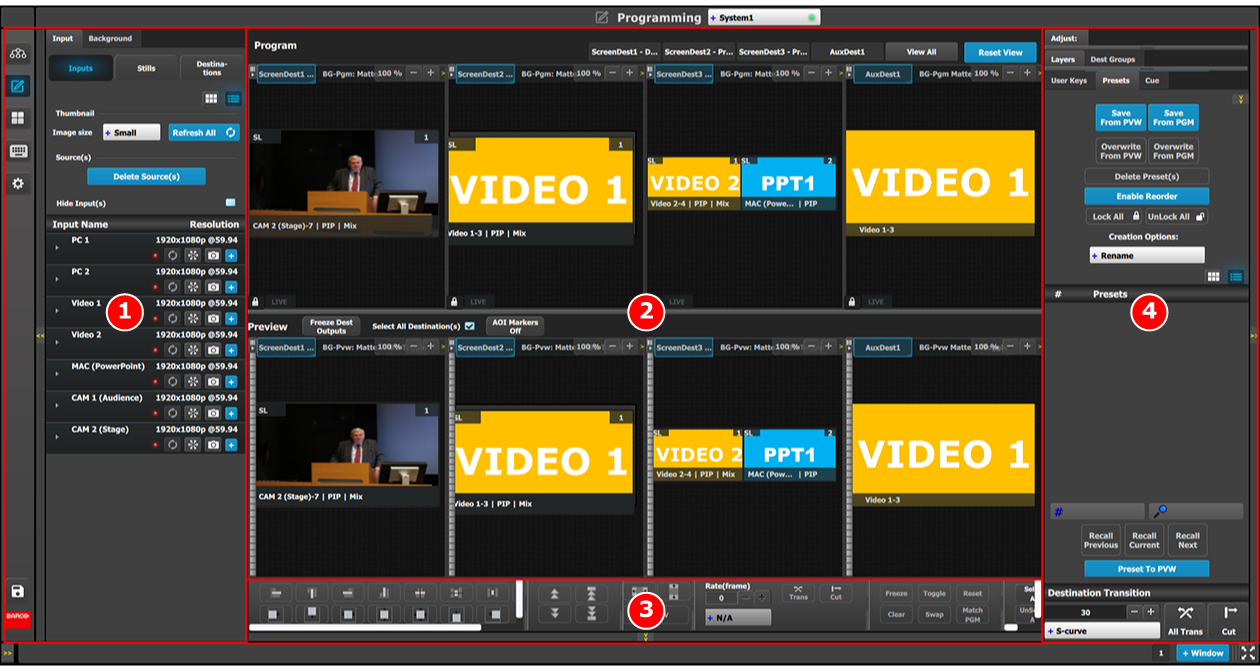
Description
Image 6–29 Programming Menu Overview
1Resources areaThis area contains the available resources for programming and playback, as inputs and sources. Also in this area the still store (logo) images are shown.
2Workspace / Programming Diagram area

For each destination the Program and Preview screens can be viewed individually by selecting the corresponding tab. All Program and Previews screens can be viewed simultaneously by selecting the “View All” button.

The space between Program and Preview has Layouts, a function where a certain group of destinations can be laid out in the workspace

3Workspace / System wide functionLayer Alignment adjustments and controls to manage the Preview/Program screens.
4Adjustment areaThe menus in this area provide control of parameters for selected layer and source. These can be modified and managed. This is where creation of User Keys and presets is done

The following sections describe each part of the Programming page in detail: