4.5 Linking multiple Encore3 units

Note: Only two Encore3 units can be linked
Prerequisites

The Encore3 units must installed in their final location or in a rack. For more information on rack mounting, see “Rack mounting”.

Caution: Ensure the Encore3 units are installed near each other. Do not tension the QSFP28 link cables.
How to link
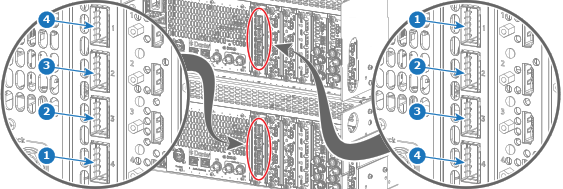
  1. Connect the Encore3 units using a QSFP28 link cable as illustrated.

    1. Connect port ‘1’ of the top Encore3 to port ‘4’ of the bottom Encore3 (reference 1).
    2. Connect port ‘2’ of the top Encore3 to port ‘3’ of the bottom Encore3 (reference 2).
    3. Connect port ‘3’ of the top Encore3 to port ‘2’ of the bottom Encore3 (reference 3).
    4. Connect port ‘4’ of the top Encore3 to port ‘1’ of the bottom Encore3 (reference 4).
    Tip: For a diagram of the connection, see “System view”.
    Image 4–12
  2. Assign a different IP address and ID for each Encore3. For more information, see:

    Tip: It is recommended to set the ID of the host to ‘0’.