6.4.1 Manage software (USB)

Location

Tools > Manage Software

About software upgrade

In addition to updating the software, it is also possible to reload the current version or to downgrade. Keep in mind that downgrading a system can cause issues. Barco recommends creating a backup before upgrading the software. For more information, see:

Required parts

8GB+ USB stick formatted in FAT32.

How to update
  1. Store the desired software file in a folder ‘em’ on the USB stick.
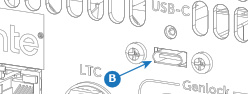
  2. Insert the USB stick in the desired port:
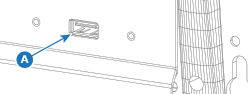
    • ‘USB-A’ port (reference A) at the front.
    • ‘USB-C’ port (reference B) at the back.
    Image 6–5
    Image 6–6
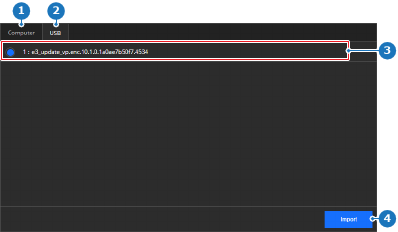
  3. Select USB (reference 2) in the main window.

    Image 6–7
    1
    Computer tab
    2
    USB tab
    3
    Detected software list
    4
    Import button
  4. Select the desired file from the list (reference 3, Image 6–7).
  5. Click Import (reference 4, Image 6–7).

    The software is installed and the unit reboots.

  6. Remove the USB stick.