Availability
- Operating system: Windows and MacOS
- Base Unit: CX-20, CX-30, CX-50, CX-20 Gen2, CX-30 Gen2, CX-M, CX-50 Gen2, CB Core and CB Pro
- Room feature: 4th gen Button (optional)

Taking over simplifies which user device is using conference view. Any user device can stop the conference view of another user device and immediately start a new conference view at any time. This reduces the amount of actions that must be done to switch between user devices.
At least two different user devices must be connected to the ClickShare. One of these user devices must be using conference view. For more information, see:
| Connecting | Sharing |

Is the connection made using a Button?


Share content using the conferencing app. For more information, see the documentation of the conferencing app.

Click on a layout in the Desktop App or Button App (reference 5).
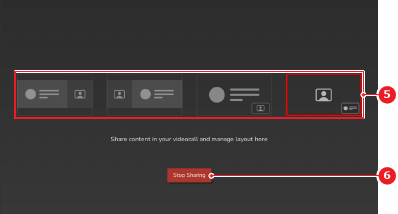
The layout is changed on the meeting room display.