Issue
The ClickShare Button may disconnect unexpectedly when connected to a Windows device. This issue is often caused by specific power settings in Windows that manage USB power.
Cause
When the USB selective suspend setting or the USB power-saving setting is enabled in Windows, your ClickShare Button will disconnect whenever your PC goes to standby or sleep mode.
Solution
To resolve this issue, you need to adjust the power settings in Windows to prevent the system from turning off USB devices.
Windows 11
On Windows 11 machines, the USB power settings are no longer present within the Power Options menu. The setting can be adapted via the Device Manager, properties of the ClickShare Button.
On Windows 11 machines, the USB power settings are no longer present within the Power Options menu. The setting can be adapted via the Device Manager, properties of the ClickShare Button.
Uncheck the checkbox Allow the computer to turn off this device to save power.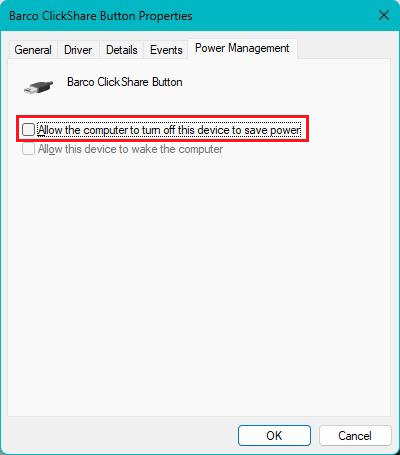
Windows 10
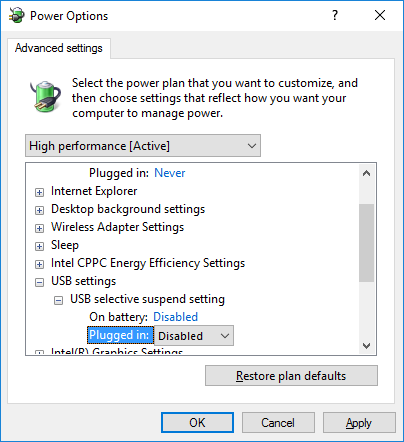
- Open the Windows Power Options by going to Control Panel or right clicking the battery icon.
- Go to Advanced power settings.
- Make sure that the USB selective suspend setting is disabled.