Поиск Barco

Уведомления myBarco

Непрочитанные

Прочитанные

У вас нет никаких уведомлений.
Продукты
Продукты

What does meeting room technology really cost? 7 costs beyond the purchase price

Время чтения: 5 мин.

Comparing the cost of meeting room solutions can appear straightforward on the surface. One system costs X, another costs Y, and the cheaper option appears to be the better investment.

Until you start running the rooms.

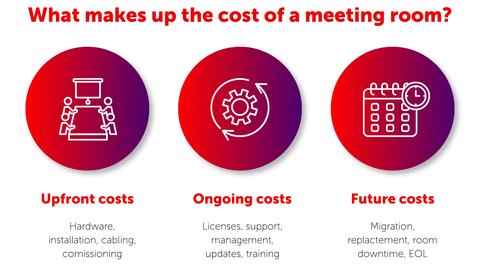
Meeting room technology is typically expected to stay in place for years, and the purchase price is only the beginning of what your organization will spend during that time. Licenses renew. Software needs updating. Users call IT when something does not work. Rooms are refurbished. Collaboration platforms change. Hardware reaches end of life.

That is why a meaningful comparison needs to look beyond purchase price and consider the total cost of ownership (TCO) across the lifecycle of the room. 

So where should IT and AV teams be looking?

1. Infrastructure and installation

Installation costs are easier to estimate when they are informed by a site survey. Put simply, a site survey checks whether the room and the building are ready for the technology you plan to install. That means looking at what is already there, including network connectivity, power, cabling and existing AV equipment, and identifying anything that needs to be added, replaced or configured.

This is especially valuable when moving into a new building, refurbishing existing spaces, or transferring equipment between rooms. A network port may physically be in the room, for example, but that does not necessarily mean it has already been configured for the device that will use it. Existing cabling may also be undocumented, damaged or unsuitable for a new room setup.

Finding those issues before installation makes it easier to account for the work and cost involved. Finding them halfway through a rollout can mean delays, additional engineering time, or even recabling.

For larger deployments, a proof of concept can validate the complete setup, from network access and device enrollment to user workflows and support processes, before a wider rollout begins. Testing in a real room also gives teams a clearer view of the installation effort, management requirements, and user experience they can expect at scale. 

Reusing compatible equipment

ClickShare can work with a wide range of displays, cameras, microphones, and speakers, giving organizations the option to reuse parts of their current AV setup rather than automatically replacing every component. 

2. Licenses, subscriptions, and service costs

The hardware purchase may happen once, but some of the costs associated with operating a meeting room come back every month or every year.

Depending on the room architecture and platforms involved, organizations may need to budget for UC room or device licenses, software subscriptions, support contracts, extended warranties or management services.

A recurring charge can look relatively small when viewed for one room and one year. Multiply it across 100 meeting spaces over five years and the calculation changes considerably.

This is also why IT teams need to look carefully at what comes with the technology they are buying. Which capabilities are included in the original investment, and which will require additional licenses or subscriptions over the life of the room? 

Software and firmware updates, device management and monitoring, warranty coverage, and support can all affect the long-term calculation. If one solution includes these capabilities while another requires separate tools or contracts, the purchase prices do not tell the full story.

3. IT support and management

This is where TCO calculations can get deceptively difficult.

A support ticket does not carry a price tag in the same way a device does, but the people resolving those tickets certainly cost money.

Every time IT has to visit a meeting room because someone cannot start a call, connect to a peripheral, or use the room as expected, that room generates an operational cost.

The same applies to time spent diagnosing issues remotely, coordinating with suppliers, or escalating problems between IT, facilities, and AV teams. 

Multiply that by the number of rooms, meetings, and users in an organization, and small inefficiencies start to add up.

Room design therefore affects TCO in ways that will never appear on a hardware quote. A simpler user workflow can reduce training and support requirements, while centralized monitoring and device management can help IT teams identify and investigate certain issues without immediately visiting the room.

When comparing meeting room technologies, organizations should consider what the system will require from IT every week for the next several years. Looking at typical support time, update tasks, and room visits over a month can make this internal workload easier to compare.

Managing the room estate

XMS Cloud gives IT teams visibility of connected ClickShare devices across their room estate. By providing system health information, device notifications, and remote firmware management, it can help teams investigate certain issues before deciding whether someone needs to visit the room.

4. Training and lost user time

IT time is only one side of the equation. The time employees spend figuring out meeting-room technology also has a cost.

A new room standard may require onboarding and training, particularly if the experience differs significantly between spaces. Even after rollout, unfamiliar or complicated workflows can lead to delayed meeting starts, lost time, and calls to IT.

If each room asks users to join, present, or access peripherals differently, the organization pays for that inconsistency through repeated questions and lost time. A familiar way of working across different room types can reduce how often employees need instructions or assistance.

This is one reason the user experience should be tested during a proof of concept. Can regular employees, occasional users, and guests complete common meeting tasks without needing to relearn the room? 

Making rooms easier to use

ClickShare supports a familiar way to share content across different meeting spaces, including wireless presentation in a Microsoft Teams Room. Depending on the setup, users can run a meeting from their laptop or start a native Microsoft Teams meeting from the room system. A consistent way to present and collaborate can make rooms easier for employees and guests to use.

5. Security, maintenance, and lifecycle management


Connected meeting room technology needs attention throughout its working life. Firmware and software must be updated, vulnerabilities monitored, devices inventoried, and access policies maintained. Hardware will eventually require repair or replacement, while changes to operating systems and collaboration platforms can introduce new compatibility requirements.

Buyers should therefore look beyond whether a solution meets security and performance requirements on day one. They should also ask how it will be monitored, updated, and supported across the full room estate.

Which firmware and software updates are included? Are major releases, new features, or security updates covered, or could some require a separate license, service plan, or upgrade fee? Can devices be managed remotely? Who is responsible for monitoring vulnerabilities? How long will the product receive support? What happens when a component reaches the end of its supported life?

Answers should be clear before deployment. A documented update process, central management option, defined support period, and clear ownership model all make future costs easier to anticipate. 

These activities require tools, services, and IT time. If they are missing from the original calculation, they do not disappear. They simply emerge as operating costs later.

6. Adapting your room strategy

The meeting platform or room standard that fits today may not reflect what the organization needs three or five years from now. That makes flexibility during the investment period an important part of TCO, even while the technology remains fully supported and in use.

Requirements can change without an organization abandoning its chosen collaboration platform. A room may need to support new peripherals, updated security requirements, different layouts, or new meeting capabilities. In other cases, the organization may introduce another platform or room standard alongside the existing environment.

The cost of adapting will depend partly on how tightly the room’s components are tied together. If one change requires the complete setup to be replaced or extensively reconfigured, a relatively small shift in requirements can become a significant expense.

Before selecting a meeting-room architecture, consider how well it leaves room for change.


  • Can a new solution be introduced room by room?
  • Can old and new room standards coexist during migration?
  • How much existing AV equipment can continue to be used?
  • What happens if the collaboration platform changes?
  • Can you reverse the decision without rebuilding the room?

The cheapest option today can become considerably less attractive if changing direction later requires another major investment. Flexibility can also come from giving a room more than one way to support meetings, without compromising its primary room-system experience.

Building in room for change

ClickShare Hub combines a modular Microsoft Teams Room with wireless presentation and Wireless Bring Your Own Device (BYOD) capabilities. Users can start native Microsoft Teams meetings directly from the room system. For alternative platforms such as Zoom, Webex, or Google Meet, meeting participants can plug the ClickShare Button into their laptop and wirelessly connect to the room’s camera, microphone, speakers, and display. This gives organizations more flexibility to handle different meeting scenarios without changing the room’s core Microsoft Teams setup.

7. End-of-life and exit costs

Adapting a room strategy while the technology is still in use is one consideration. Eventually leaving or replacing the solution is another.

When equipment reaches the end of its useful or supported life, organizations may need to remove devices, transfer room accounts, update integrations, replace hardware, and revise support documentation. A planned refresh can still create room downtime and require project resources, while the equipment that cannot be reused may become a stranded investment.

The commercial model matters here. AV as a Service, for example, can bundle equipment, support, services, and refresh cycles into a recurring fee. Traditional ownership places more of those decisions and costs directly with the organization.

For AV as a Service, buyers should check what happens at the end of the agreement, including who owns the equipment, which offboarding services are included, and what happens to installed cabling and room integrations. Under a traditional ownership model, the organization will need its own plan and budget for replacement, removal, or redeployment.

Whichever approach you choose, understand both sides of the commitment.

What will it cost us to live with this decision? And what will it cost us to change it?

Look beyond the price tag

The best-value meeting room solution is not necessarily the one with the lowest initial price. It is the one whose costs remain visible, manageable, and proportionate throughout its working life.

Infrastructure, licenses, security, support, training, and future changes can all affect what a room costs over time. Two solutions with similar purchase prices may therefore produce very different financial and operational outcomes.

The Total Cost of Ownership Guide for meeting room technology takes a closer look at the costs associated with wired, wireless and mixed room models, including AVaaS, switching costs, rollback options and the role ClickShare can play in the TCO equation.

See the full cost before you commit

Compare wired, wireless, and mixed meeting room setups across their full lifecycle with the ClickShare Total Cost of Ownership Guide.