
This article explains the different ways to locate your product's serial number. This number is crucial for warranty registration, support requests, and verifying product authenticity.
Serial Number Format: The serial number for ClickShare devices can be a 9-to-10-digit number and is typically labeled as “S/N”, “Serial No”, or “Serial Number”.
Where to Find the Serial Number
You can typically find the serial number for your ClickShare device in one of the following locations:
1. On the Product Itself
- Location: The serial number is physically printed on the product. The exact location varies depending on the product type. Common places include:
- Back or bottom: Check the label attached to the back or bottom of the ClickShare product.
- Near the power cord or input/output ports: Sometimes, the serial number is placed near these areas.
- Format: The serial number, often labeled as ‘S/N’, is a 9-to-10-digit number. It may be accompanied by other identifiers such as the model number and barcode.
Example: Imagine a sticker with the following information:
S/N: 186999999On the back or bottom of the device, you might see a sticker like this (see the examples of serial numbers for various ClickShare products):
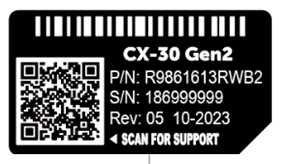
186999999 is the serial number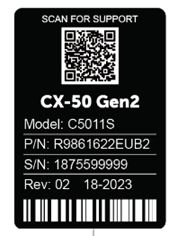
1875599999 is the serial number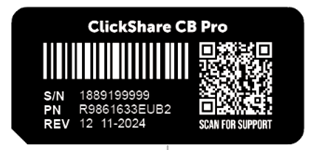
1889199999 is the serial number
2. On the Product Packaging (Box)
- Location: The serial number is usually printed on a sticker or label affixed to the product's box.
Look for a barcode label, often near other product information. - Format: Similar to the device, the serial number on the box itself is usually a number with 9-to-10-digit and is labelled as "S/N” near a barcode.
- Example: The serial number is 1862380648 as shown in the image below.

3. Via the Web Interface (ClickShare Configurator)
- Devices with Network Connectivity: Our products with network capabilities (Wi-Fi, Ethernet, etc.) display the serial number in their web-based management interface.
- How to Access:
- Connect to the product's network: Connecting your computer or mobile device to the same network as the product.
- Login to the ClickShare Configurator of your product: Open a web-browser, type the product's IP address and enter the login credentials "username: admin", "password: admin". For detailed how-to instructions, see KB 2324.
- Navigate to System > Status page: The serial number is displayed on a page with details about the product. The exact menu names may vary depending on the product.
- Format: The serial number, often labeled as ‘Serial number’, is a 9-to-10-digit number.
- Example: The serial number is 1862380648 as shown in the image below:

4. Using the ClickShare App
- Location: The About menu in the ClickShare App interface contains information about the product's serial number.
- How to Access:
- Connect to your ClickShare device: Connect by plugging the ClickShare Button to your computer or laptop or connect using ClickShare Desktop App.
- Open the About menu: Click the hamburger (≡) menu icon and then select About to view the product serial number.
- Format: The serial number, often labeled as ‘Serial No’, is a 9-to-10-digit number.
- Example: The serial number is 1862380648 as shown in the image below:

5. Through XMS Cloud Interface
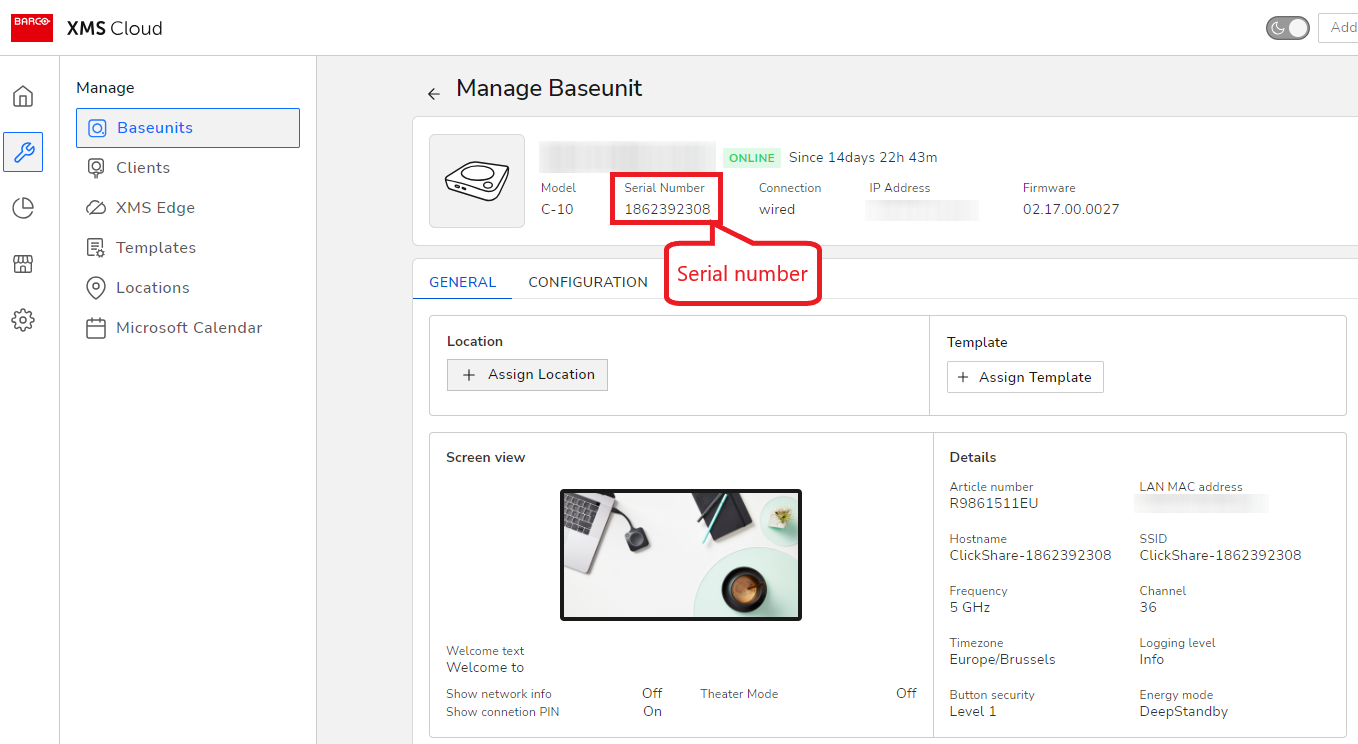
- Location: The Manage Baseunits page in the XMS Cloud contains information about the product's serial number.
- How to access:
- Login to your XMS Cloud (how to: see KB 2324).
- Navigate to the Manage > Baseunits page.
- Click on the ⚙ icon of your Base Unit to open its Manage Baseunit page.
- The product’s serial number can be found at the top, next to the model's name.
- Format: The serial number, often labeled as ‘Serial Number’, is a 9-to-10-digit number.
- Example: The serial number is 1862392308 as shown in the image below:
Note: At present, the serial number for ClickShare Hub Core and Hub Pro cannot be obtained using the ClickShare Configurator or ClickShare App.

