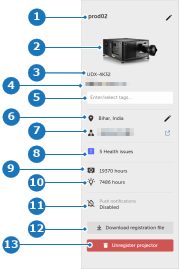
| 1 | | Device name ... |  Modify or enter a new name. See “Changing device name”. Modify or enter a new name. See “Changing device name”. |
| 2 | | Shows a thumbnail of the product line. | |
| 3 | | Model name of the device. | Automatically filled in when registering the device. See “Device registration”. |
| 4 |  | Serial number of the device. |  Copy to clipboard. Copy to clipboard. |
| 5 | | Displays all tags applied. | Click the field to add or delete tags. See “Adding tags”. |
| 6 |  | Device location. | Opens the window to change the device location. See “Updating location”. |
| 7 |  | Shows the most recent IP address. | Go to network configuration. Copy to clipboard.  Display network properties. Display network properties.
 Open Pulse Prospector. Open Pulse Prospector.
See “Network”. |
| 8 | 


| Health issue notifications. | Normal: The device is working properly. No errors or warnings are present. Caution: some actions are needed in order to keep the device operational. The caution icon is followed by the number of cautions. Warning: the device is reaching a state where it may become impossible to keep it in an operational mode if no action is taken soon. The projector will continue to operate as long as possible. The warning icon is followed by the number of warnings. Error: the correct or safe operation is no longer guaranteed. The error icon is followed by the number of errors. See also “Health ”. |
| 9 | 

| Total hours of device usage. | Device is connected to the cloud platform. Device is not connected to the cloud platform. If the device is not connected to the cloud platform, the number of days since its last connection is displayed. See also “Usage”. |
| 10 | 

| Total hours of light source usage. | Light source is currently off. Light source is currently on. See also “Usage”. |
| 11 | 

| Push notification toggle button. | Subscribed to receive notifications for the device. Not subscribed to receive notifications for the device. See also “Restoring suppressed notifications”. |
| 12 | | Download registration file button. | |
| 13 |  | Unregister button. | Opens the window to unregister the device. See “Unregister device”. |