5.4.2 Restore

Location

ShowFile Management > Restore

About restore

Restore applies device configurations and user created shows from a ShowFile to the Encore3. Restoring overwrites any current configurations and shows that are present on the Encore3. Barco recommends creating a backup before restoring a ShowFile. For more information, see:

Required parts

8GB+ USB stick formatted in FAT32.

How to restore
  1. Store the desired ShowFile file in a folder ‘EM\backup\sys’ on the USB stick.
  2. Insert the USB stick in the desired port:
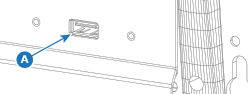
    • ‘USB-A’ port (reference A) at the front.
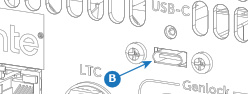
    • ‘USB-C’ port (reference B) at the back.
    Image 5–25
    Image 5–26
  3. Select the desired ShowFile from the list (reference 4).
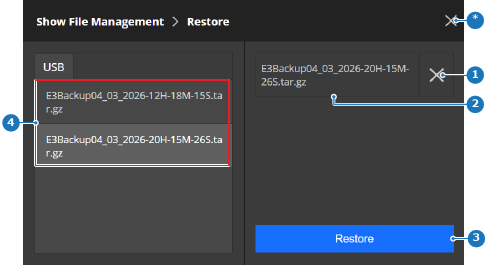
    Image 5–27
    1
    Deselect ShowFile button
    2
    Selected ShowFile label
    3
    Restore button
    4
    Detected ShowFile list
    *
    Close button
  4. Tap on Restore (reference 3, Image 5–27).

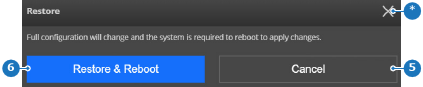
    A confirmation pop-up is shown.

  5. Tap on Restore & Reboot (reference 6) to recall the settings from the ShowFile.

    Note: All the current settings will be overwritten. This action cannot be undone.
    Tip: If only certain settings must be restored, then see “ShowFile editor”.
    Image 5–28
    5
    Cancel button
    6
    Restore button
    *
    Close button

    The ShowFile settings are applied and the Encore3 reboots.

  6. Remove the USB stick.