
The ClickShare Hub Base Unit is powered through a standard USB-C connection. Proper power supply ensures stable operation and enables additional features such as laptop charging when using wired video input.
For optimal performance, we recommend using Barco’s power supply unit to power up ClickShare Hub.
Power options
There are two supported power adapters for the Base Unit:
- Standard 100W Barco Adapter
Provides sufficient power for normal operation of the Base Unit. - 180W Barco Adapter
Recommended when you want to charge a laptop while using wired video input [See also].
How to power the Base Unit
- Connect the Power Adapter
Plug the desired Barco power adapter into the USB-C port (reference 1) on the Base Unit.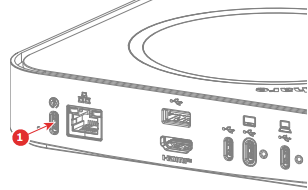
ClickShare Hub Core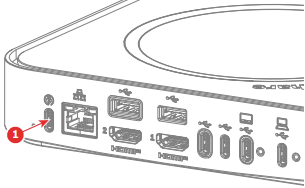
ClickShare Hub Pro - Plug into Wall Socket
Connect the power adapter to a standard wall outlet. - Verify Power Status
When sufficient power is provided, the standby button on the front of the Base Unit will light up, indicating readiness.

