
What is Rogue AP detection or Wireless Intrusion Protection Systems (WIPS)
Many Wi-Fi network manufacturers provide Wireless Intrusion Protection Systems (WIPS) to enhance security of their Wi-Fi networks – these include Aruba, Ubiquiti, Cisco, Juniper, and others. They can be configured to monitor the ‘air quality’ and also monitor for Rogue Access Points and unmanaged SSID’s allowing the network administrator to ‘contain’ any malicious Wi-Fi Devices. As the Clickshare Base Unit’s typically act as Wireless Access Points this can have an impact on their ability to maintain stable connections with the clients (Buttons and other Wi-Fi connections).
As an example, on Cisco
Cisco has the option of configuring Rogue Access Point Detection in Wi-Fi controllers and also in their Cloud based Meraki Management Interface.
Some Meraki Access Points with dual radio (2.4GHz and 5GHz) will run wireless scans opportunistically whilst also serving Clients and it’s possible to schedule scans as frequently as once per day. Many Meraki AP’s have a 3rd radio which is dedicated to scanning the local environment permanently.
Cisco Meraki Air Marshall groups devices found during the scan as shown in the Meraki Air Marshall User Interface.
Rogue Access Points are AP’s that have access to the company network.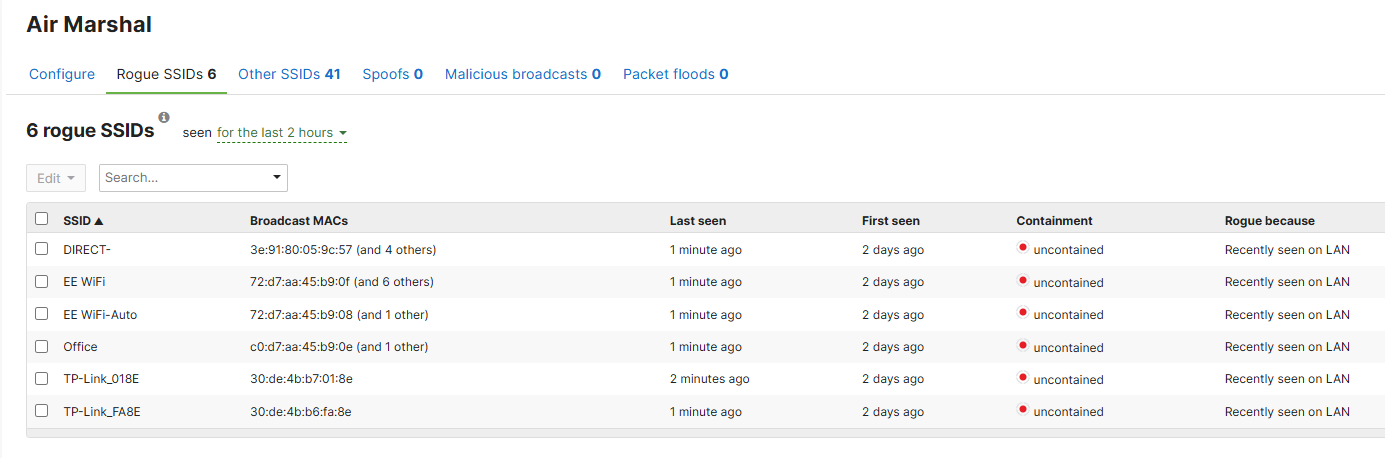
Other SSID’s are wireless networks that are broadcasting and could be causing RF interference. Clickshare Base Unit’s will typically be shown as ‘Other SSID’s’ because they can’t be used to access the company LAN.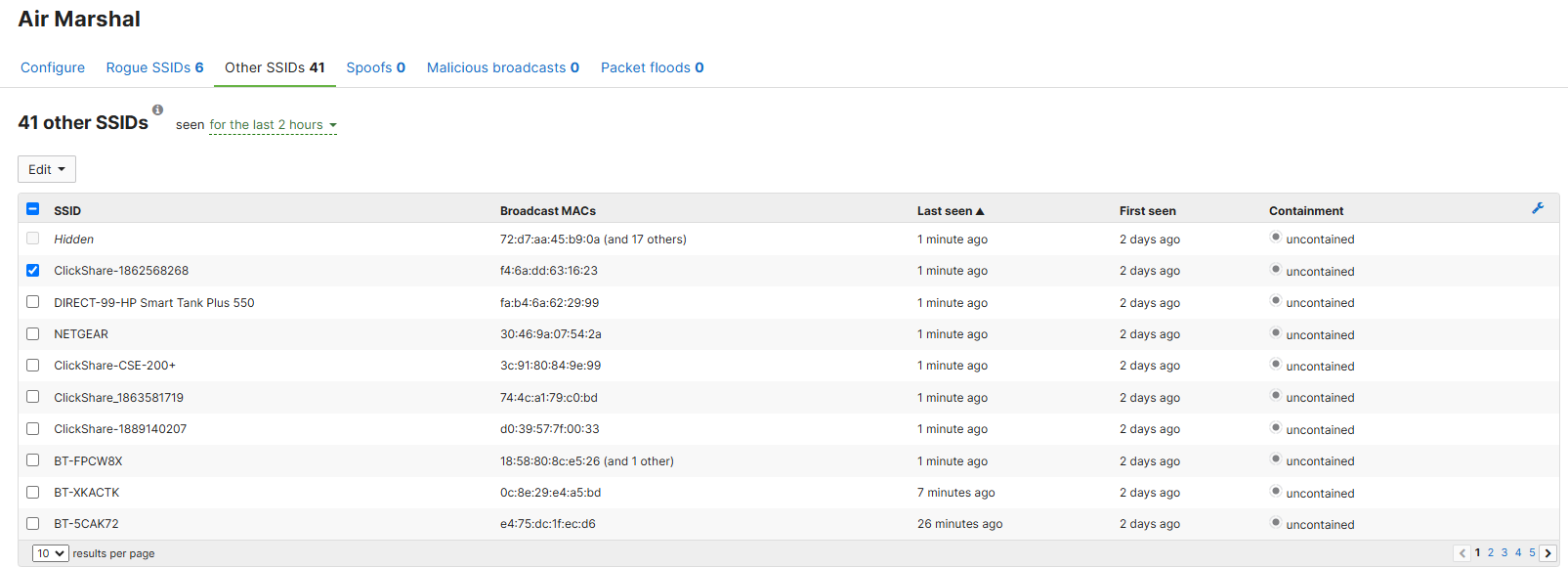
It’s possible to configure Air Marshal with rules to determine if Rogue or other SSID’s will be blocked or allowed which is typically done using the SSID or BSSID (specific access point). The screenshot below shows an example of how a Rogue AP can be ‘whitelisted’ but this can also be done with ‘other SSID’s’.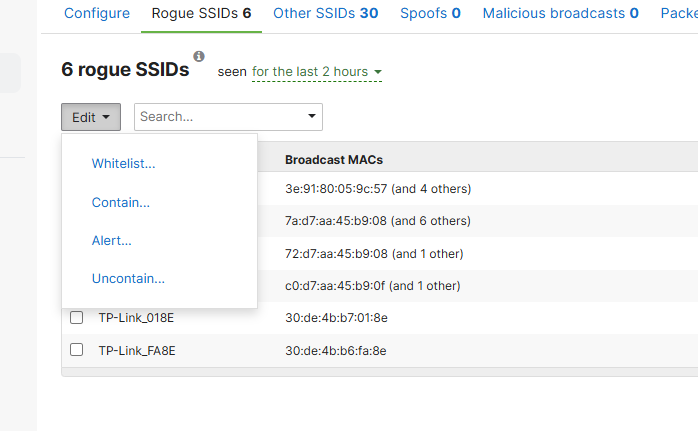
Containment of Rogue and others SSID’s, that are seen as possible intrusion targets is typically done by spoofing the MAC Address of the device and sending over the air De-Authentication packets to the Client and/or the BSSID of the Rogue AP. If this occurs the Button or Application logs will typically show the ‘de-authorization’ print.
In the Dongle Log (button log) this will show as:Info : 2025-01-12 20:02:16.364 : [Dongle log] (3299-32:29:345 wpa_supplicant )[wsa_connectionEventHandle: 211] INFO:WC_NETDEV_UNAUTHORIZED
In the Base Unit logs it will show as:2025-01-12T20:27:23.189495+00:00 ClickShare-1889140207 buttoncontroller: [INFO] [7fa527cde0] [00011][1200121032<REMOTE>][Button](0574-01:45:759 wpa_supplicant )[wsa_connectionEventHandle: 211] INFO: WC_NETDEV_UNAUTHORIZED
Note: If the de-authentication packet is sent only to the client, there may be no obvious log print in the base unit logs other than that the client has disconnected.
Note: With Cisco Wi-Fi Controllers it’s also possible also that the Wi-Fi controller is actually disrupting the ClickShare signal classifying it as Rogue AP, despite Cisco Clean Air technology being set to report only. It can be necessary to set the ClickShare Base Unit as a friendly rogue APs to stop it being unauthorized.
Whitelisting
You can use SSID whitelist what allows you to use similar rules to the blacklist, but for specifying what kind of SSIDs should not be blocked, allowing you to enable certain WiFi-Direct devices on your network without needing to manually unblock them (such as printers, remotes, client devices, etc. that broadcast their own SSIDs).
Info to whitelist your ClickShare SSID by MAC's otherwise you will need to whitelist every SSID that ClickShare is transmitting.
Examples: Here are the first three Wi-Fi MAC Octets for ClickShare devices:
| CX-series | F8:A2:D6 |
| C-series | 14:4D:14 |
| CB Core and Pro | D0:39:57 |
| CS-100 | D8:61:62 |
| CSE-200 | 28:24:FF |
| CSE-200+ | F8:A2:D6 |
| CSE-800 | 28:24:FF |
There are several other ways to whitelist the ClickShare devices. Please refer to the documentation of your network equipment for instructions on how to do this.
Additional note
If the Wi-Fi Access point has firewall capabilities, make sure that the firewall rules allow connection to the Base Unit. By default, for example, Meraki Access Points in their standard configuration will deny access to the local LAN addresses:
- 10.0.0.0/8
- 172.16.0.0/12
- 192.168.0.0/16”

