
Audio mirroring on macOS requires a virtual audio driver. If the correct driver is not installed or configured, audio will not be transmitted when using the ClickShare Desktop App.
ClickShare uses a general audio driver to enable audio mirroring on Apple devices. The driver used depends on the Mac’s processor type:
- Intel-based (x86) Macs → Use Soundflower
- Apple Silicon (M-based) Macs → Use BlackHole
Automatic installation
As of ClickShare Desktop App version 4.21.0, the required audio driver is included within the application package and is automatically detected.
Based on the device platform and operating system, the appropriate audio driver (such as Soundflower) is selected and installed.
To manually start the installation on a Mac, select the Soundflower.pkg file and drag and drop it into the Applications folder. This action initiates the installation of the correct audio driver.
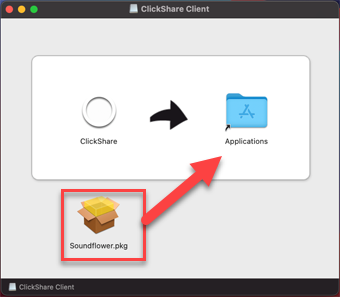
For general instructions on Mac: See KB1981.
Manual Installation (Apple Silicon only)
Install BlackHole manually:
- Install Homebrew. Open Terminal and run:
/bin/bash -c "$(curl -fsSL https://raw.githubusercontent.com/Homebrew/install/HEAD/install.sh)" - Configure Homebrew. Run the following commands (replace
YourProfileNamewith your macOS username):echo >> /Users/YourProfileName/.zprofile echo 'eval "$(/opt/homebrew/bin/brew shellenv zsh)"' >> /Users/YourProfileName/.zprofile eval "$(/opt/homebrew/bin/brew shellenv zsh)" - Install Blackhole via Homebrew.
brew install blackhole-2ch -
Restart your Mac (Apple device) to complete the installation.

