
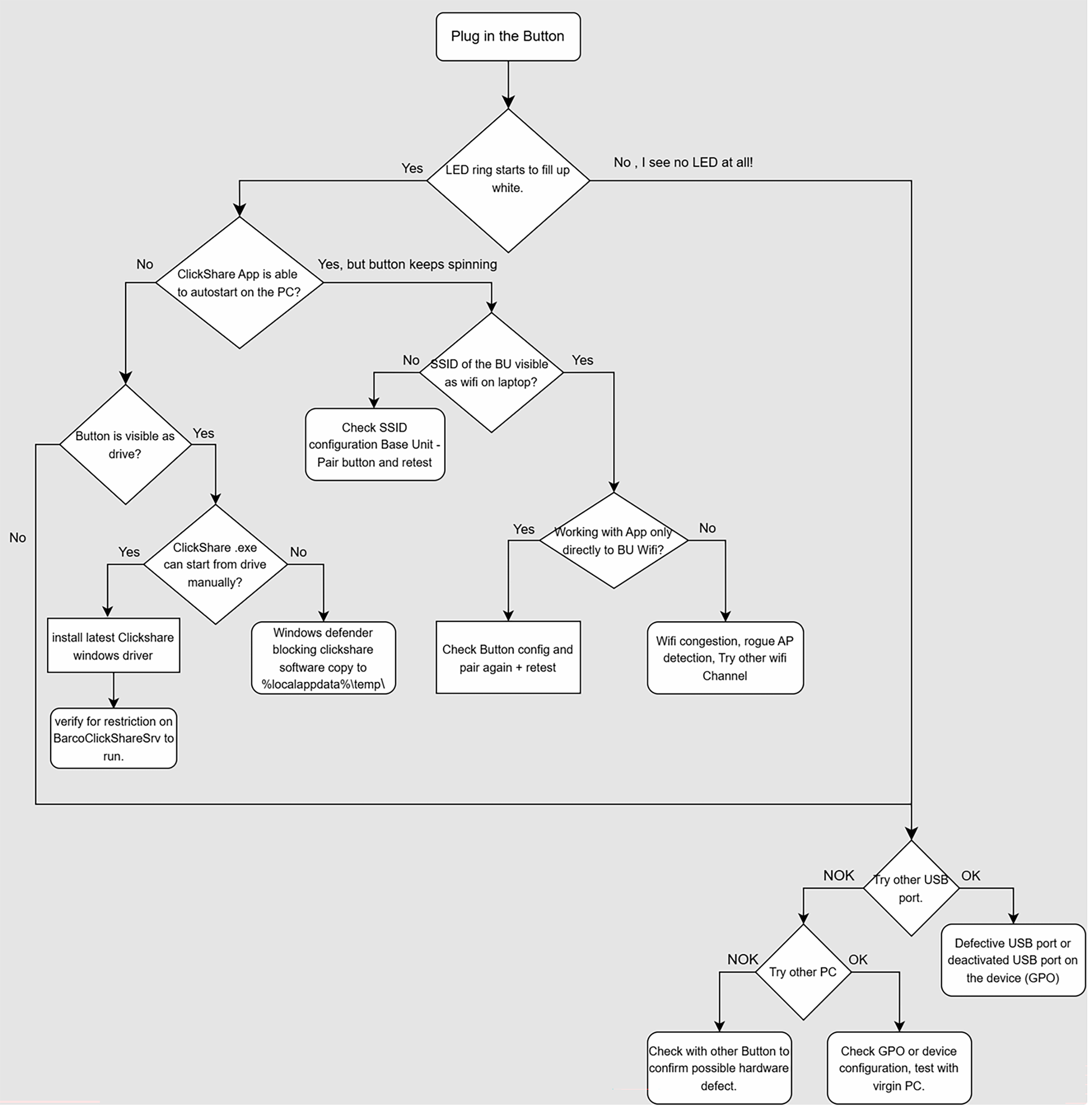
If you’re experiencing connection issues with the ClickShare Button when connecting it to your laptop, please refer to the flowchart diagram for a step-by-step troubleshooting guide.
Flowchart for troubleshooting ClickShare Button connection issues
⚠️Before contacting Barco Support — quick component isolation test
If your Button is not pairing or keeps disconnecting, try the following two checks first and include the result when opening your service ticket — this will help us send the right replacement immediately:
- Check 1: Plug your Button into a different ClickShare Base Unit (same generation).
Does it pair?- Yes → your original Base Unit is likely faulty. Mention this in your ticket.
- No → your Button is likely faulty. Proceed to Check 2.
- Check 2: Plug a different Button into your original Base Unit.
Does it pair?- Yes → your original Button is faulty. Mention this in your ticket.
- No → your Base Unit is likely faulty. Mention this in your ticket.
If you don't have a spare Button or base unit to test with, simply note this when opening your ticket.
ℹ️Contact Barco Support
For any other issues related to the Button not connecting or experiencing disconnections, please contact Barco Helpdesk by creating a service ticket (how-to: see KB6024).

