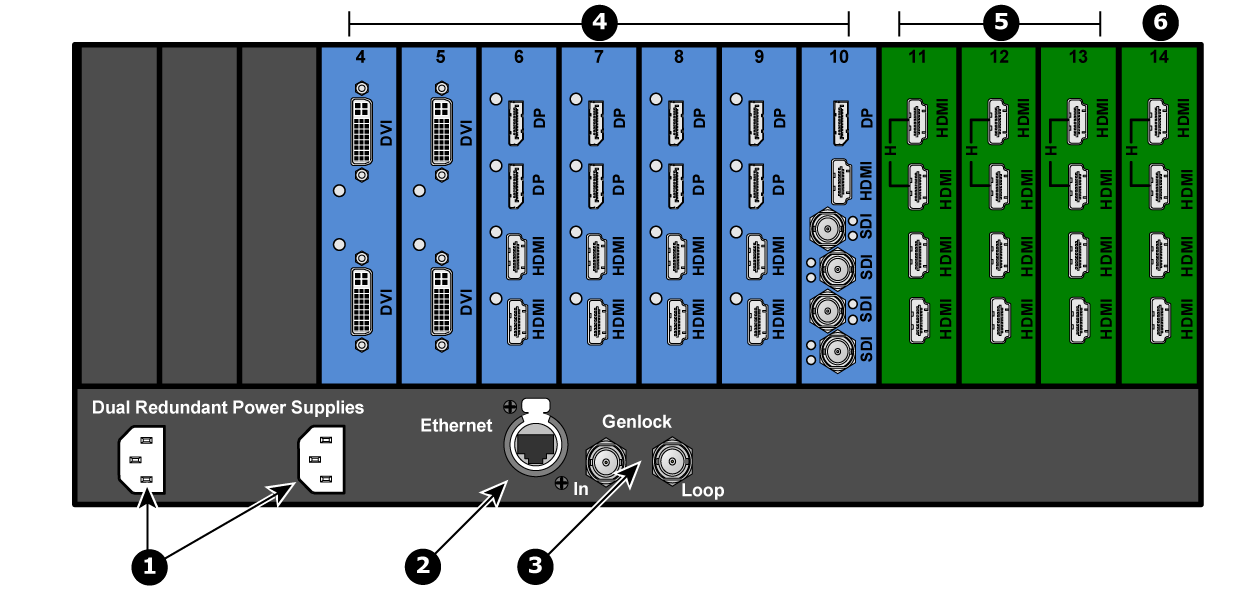
See Image 4–4 for an illustration of the rear panel of the Event Master E2 Lite video processor.
Image 4–4E2 Lite rear panel
1
AC connectors
2
RJ-45 connector for 10/100 BaseT Ethernet communications
3
Genlock Input BNC with passive Loop-through
4
Input cards (DVI, HDMI/DP, and Tri-Combo)
5
Output cards (HDMI)
6
Multiviewer (HDMI)
AC connectors
The Event Master E2 Lite is equipped with two redundant power supplies. During normal operation the load is shared equally by both supplies. If one supply fails, the second carries the whole load. Two AC connectors are provided to connect the E2 Lite video processor to your facility’s AC power source through the supplied power cords.
Input Power Specification: 100-240 VAC, 47-63 Hz
On each power supply there are 3 LED lights that provide status information as follows:
DC Output Power LED: when Green, the supply is outputting valid DC power.
Status LED: when amber indicates that an error has occurred.
AC Input Power LED: when green it indicates that the supply is connected to a valid AC power.
Therefore, during normal operating conditions, the input AC and Output DC LEDs will turn green.
Note: The power supplies are installed upside down in the E2 Lite video processor, so the silk-screen markings will also appear upside down.
Ethernet port
One RJ-45 connector is provided for 10/100BaseT Ethernet communications with the Event Master series processor. The port is used for running the Web Interface.
The Ethernet connector is compatible with:
Standard RJ-45 Ethernet cables
Neutrik EtherCon® series cables
For pinout details, refer to the section dedicated to the pinout in Appendix A, “Standard connector pinouts”.
Genlock Input BNC (with passive Loop-through)
The Genlock input supports analog NTSC and PAL Blackburst, as well as HD tri-level sync signals, per SMPTE 274M and SMPTE 296M. The passive loop-through connector passes the Genlock signal to another device downstream of the Event Master series processor. The Loop-through output will continue to function even when the device is turned off. When the device is genlocked and the lock source is lost, the output of the unit will automatically switch to “free-run” state without any discernible “glitching” on the output display device. As the loop-thru is passive a 75Ohm termination is necessary for stable operation.
For Genlock connections details, refer to the Specifications Appendix.
VPU cards
VPU (Video Processing Unit) cards are at the heart of the Event Master Series of products. All scaling, layer effects and image compositing happens within these cards. Each card supports the scaling requirements for the product line with the award-winning Athena scaling technology at resolutions up to 4K. Due to their reprogrammability any future video processing capabilities will be implemented in these cards. Current capabilities include:
Support for 2K, Dual-Link, and 4K Scaling
Layer compositing over unscaled Backgrounds
Layer effects
Keying effects
On an E2 Lite the VPU cards are not accessible through the rear panel.
For more details on VPU cards, refer to the section “VPU card”.
Input cards
Each input card supports resolutions of up to 4K. The ability of the E2 Lite processor to support up to 32 inputs eliminates, in most cases, the need to have upstream routers or scalers.
Each card slot could accommodate either:
4x up-to HD/2K inputs
2x 2560x1600 inputs
1x 4K input
On an E2 Lite processor, slots 3 through 10 are reserved for input cards.
The following sections describe each type of card in detail:
Note: Each input card slot supports one 4K/UHD signal. The right-most input slot supports two 4K/UHD signals (with the second generation Tri-Combo Input card).
Outputs cards
The Event Master E2 Lite video processor supports HDMI output cards. Each output card supports resolutions of up to 1920x1200.
On an E2 Lite processor, slots 11 through 13 are reserved for output cards.
Refer to “HDMI output card” for a detailed description of the HDMI output card.
Multiviewer (MVR) card
The Multiviewer card is physically identical to the HDMI output card, but when it’s plugged in the last slot it operates as a Multiviewer (MVR), supporting two (2) HD outputs. The Multiviewer card is a dedicated, fully integrated monitoring solution that allows multiple displays to be shown together on a single display. Up to 63 MVR windows (sources, backgrounds, or destinations) can be displayed across two (2) outputs: 63 windows for Inputs and 63 windows for Outputs.
From the Multiviewer menu in the EM GUI the user can select from predefined layouts, or create customized layouts, texts, backgrounds, or colors for the monitors. The MVR includes several alarms such as Frozen and Loss-of-Signal indicators. For more details on Multiviewer features, refer to the section “Multiviewer (MVR) Menu”.