Barco
  • English / Portugal
  • myBarco log in
  • New to myBarco?
  • Investors
  • Sustainability
  • Jobs
  • myBarco partner zone
  • Change language/country
  • Search
Choose your language and country settings

Should your preferred language not be available, contents will be displayed in English.

Barco
  • Products
    • Wireless collaboration
      • ClickShare
      • wePresent
    • Healthcare solutions
      • Clinical collaboration
      • Medical display systems
      • Skin imaging systems
      • Nexxis for the operating room
    • Projectors
      • Cinema projectors
      • Installation projectors
      • Postproduction projectors
      • Rental projectors
      • Simulation projectors
      • Virtual reality projectors
    • Image Processing
      • Presentation switchers and screen management
      • Scalers & converters
    • LED displays
      • LED image processing
      • Indoor LED displays
      • Outdoor LED displays
    • Video walls
      • Laser video walls
      • LED rear-projection video walls
      • LCD Video walls
      • LED video walls
      • Upgrade kits
      • Video wall controllers
    • Connectivity
      • Collaborative Learning
      • Critical decision-making
      • Networked solutions
      • A/V Control
      • A/V streaming
    • More products
      • 3D sound
      • Options & accessories
      • Services
      • Software
      • Visual display systems
    • All products »
  • Solutions
      • 3D visualisation
      • Cinema
      • Control room
      • Home entertainment
      • Live events
      • Medical imaging
      • Simulation
      • Teaching and learning
      • Themed entertainment
      • Television studio
      • Workplace
  • News
      • Blog and news
      • Press releases
      • Press contacts
      • Customer stories
      • Upcoming events
  • Services & Support
      • Services
      • Support
      • Training
      • Knowledge base
  • Contact
      • Contact
      • Office locations
      • Where to buy
  • About Barco
      • Barco Experience Center
      • Company profile
      • Corporate governance
      • Investor relations
      • Sustainability
      • Legal
      • Careers
  • Partners
      • Become a Connect! partner
      • Strategic Alliance partners
      • myBarco extranet log in
  • Investors
  • Sustainability
  • Jobs
  • myBarco partner zone
  • Change language/country
  • Search
cancel
  1. Home
  2. Products
  3. Presentation & collaboration
  4. ClickShare CSE-200

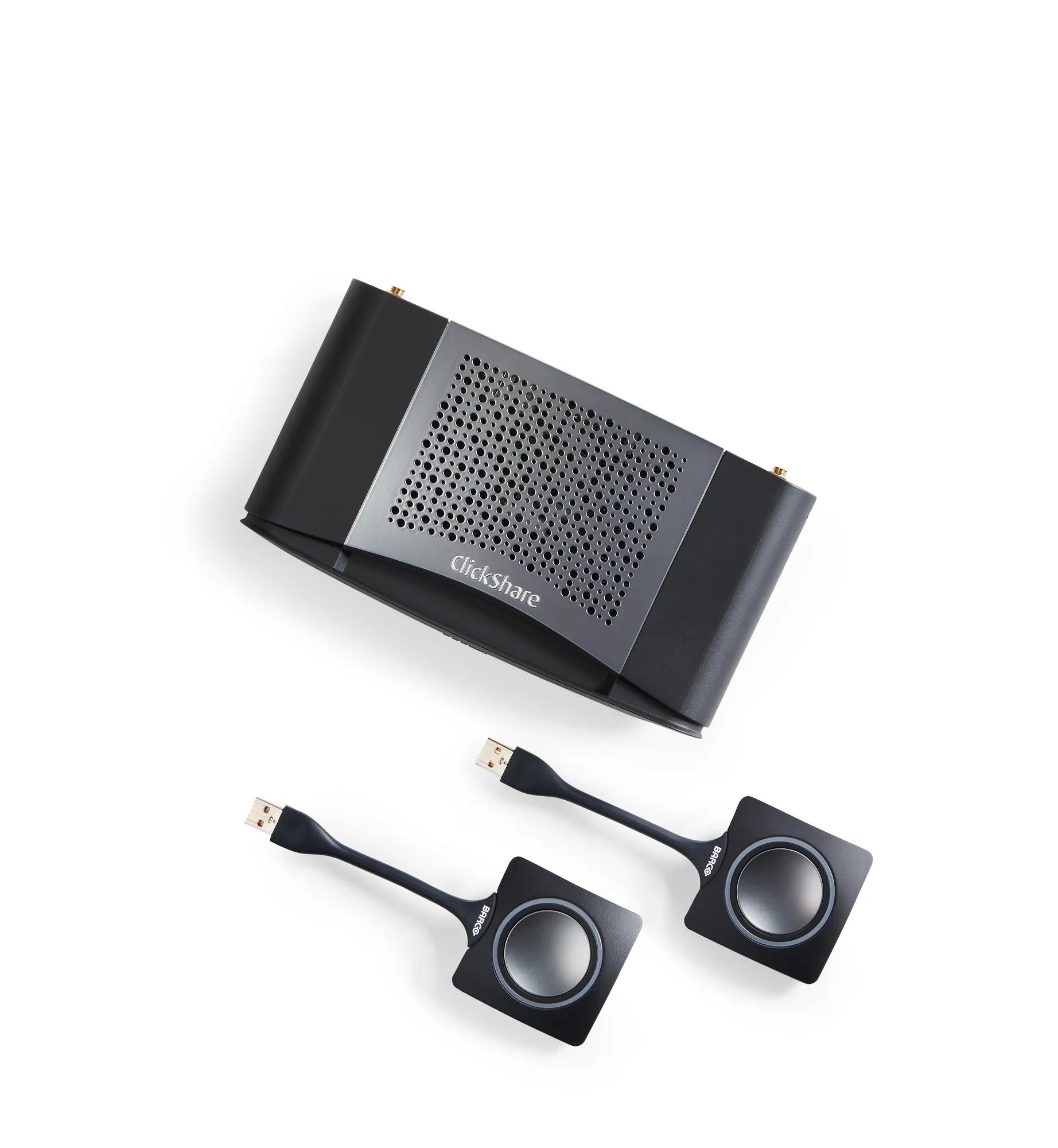
ClickShare CSE-200

Wireless presentation system for small to medium sized meeting rooms

Wireless presentation system for small to medium sized meeting rooms
  • Wireless connection to central screen
  • Up to 2 users on-screen
  • Share from laptop, tablet or smartphone
  • Enhanced security features
  • Touch back support
  • Central management
  • Delivered with 2 Buttons
  • Get your quote now
  • Where to buy
    Get your quote now

    About ClickShare CSE-200

    Creativity is one of the core assets of your organization. With ClickShare, you can make sure ideas receive the attention they deserve. This wireless presentation system allows users to simply share what’s on their laptop or mobile device, on the presentation screen. No cables, no set-up, no waiting to join in.

    Plug in to stand out

    The CSE-200 offers the ClickShare experience for small and medium-sized meeting rooms. Anyone – including guests – can connect with one click and share right away, without the need for any training. Users simply plug a USB-powered device – the ClickShare Button – into their PC or Mac and click the button to get the content from their laptop on the large meeting room screen. With the ClickShare Apps, users can also share content from their laptops, mobile phones or tablets. Make sure to have firmware version 1.7 installed on your Base Unit to enable the best experience with the Desktop App.

    Encouraging collaboration

    The CSE-200 was designed for enterprise rollouts and offers enhanced security features, a wider range of connectivity options – including AirPlay and Google Cast support for non-HDCP content – Touch back function and central management. Allowing up to 2 persons to share content simultaneously, the CSE-200 ensures direct connectivity to the central screen and encourages collaboration. For user convenience, security features of the CSE-200 can be set to one of three predefined levels, depending on the company’s policies and needs. Last but not least, the device’s API also makes integration into the company network a lot easier. ClickShare also enables the touch back function in your meeting rooms. Run any application from your laptop and control it from the screen. With a few touches on the screen, open presentations, share mails, start a video.  Focus on audience and content instead of on your presentation tool. 

    The CSE-200 is a product created with ISO 27001 certified flows and processes.


    Read more

    ClickShare Desktop App

    Download the ClickShare Desktop App for free 

    More info
    • Get your quote now
    • Where to buy

    Tools

    XMS Cloud Management Platform
    Manage all your ClickShare units from one central cloud location. Know more
    ClickShare Extension Pack
    Install the ClickShare launcher and driver for extended desktop
    ClickShare Button Manager
    Remotely pair your ClickShare Buttons for all your Base Units

    Technical whitepapers

    ClickShare Supported Touch panels
    What touch displays are touch back supported for my ClickShare device
    ClickShare Network Integration Guide
    Get started with ClickShare out of the box or in your enterprise network
    ClickShare Security Whitepaper
    Discover all about full protection, configurable security and great usability

    ClickShare CSE-200

    R9861520ZH
    R9861520EU
    R9861520NA
    R9861520CN
    list price:  
    (excl. VAT, duties and freight)
    Get your quote now
    Where to buy
    Support
    Download spec sheet

    Customer stories

    ClickShare at RTE: brand new office of the future using Barco technology
    ClickShare at RTE: brand new office of the future using Barco technology
    New York Shared Workspace Company Brings Collaboration to Life
    NeueHouse
    Smart city data at Badung Command Center, Bali, flows with accuracy and efficiency thanks to Barco solutions
    Smart city data at Badung Command Center, Bali, flows with accuracy and efficiency thanks to Barco solutions
    Port of Zeebrugge, Belgium
    Port of Zeebrugge, Belgium
    Barco ClickShare was our only choice to transform our meeting rooms into “stress-free zones”, says Sheela Foam Ltd.
    Sheela Foam Ltd.
    How ClickShare helps this municipality get things done
    Municipality of Lanaken
    Prince Rupert Port Authority
    Prince Rupert Port Authority
    Pitcher Partners simplify meetings, reduce support calls
    Pitcher Partners simplify meetings, reduce support calls
    ClickShare at the office: “It really speeds up our brainstorming sessions”
    ClickShare at the office: “It really speeds up our brainstorming sessions”
    ClickShare at The Cluster – Co-Working That Just Works
    ClickShare at The Cluster – Co-Working That Just Works

    More ClickShare wireless presentation system

    ClickShare CS-100 Huddle
    ClickShare CS-100 Huddle
    ClickShare CS-100
    ClickShare CS-100
    ClickShare CSE-800
    ClickShare CSE-800
    Button and Tray package
    Button and Tray package
    ClickShare CSE-200+
    ClickShare CSE-200+
    ClickShare USB-C Button
    ClickShare USB-C Button
    ClickShare Button
    ClickShare Button
    ClickShare Extension Pack
    ClickShare Extension Pack
    ClickShare App
    ClickShare App
    ClickShare EssentialCare
    ClickShare EssentialCare

    Other visitors also viewed

    Overture
    Overture
    Barco UniSee
    Barco UniSee
      Download spec sheet

    Specifications

      Download spec sheet

    Specifications

    More specifications

    Get a quote

    Support

    Technical support

    • Drivers & software
    • Manuals, drawings & documentation
    • Knowledge base
    • Spare parts
    • Trainings
    • Warranty information
    • Service tickets & contact support

    For technical downloads such as drivers, firmware, manuals, drawings & documentation we would kindly like to direct you to our product support page.

    For your convenience we have selected the most recent driver/firmware & manual for you to download directly below.

    Accessories

     For information about spare parts check out our spare parts support page.

    Accessories

    Others

    XMS Virtual Edge
    R9861152
    ClickShare App
    R9861018, R9861028
    ClickShare Button
    R9861500D01
    ClickShare EssentialCare
    ClickShare Extension Pack
    R33050093, R33050093, R9861002
    ClickShare USB-C Button
    R9861500D01C
    XMS Edge
    R9811007, R9811007B, R9811007F, R9811007FG, R9811007G, R9811007I, R9811007X
    ClickShare Button Manager
    R9861004

    Available modules

    ClickShare Button
    R9861500D01

    Accessories

    Others

    • XMS Virtual Edge
    • ClickShare App
    • ClickShare Button
    • ClickShare EssentialCare
    • ClickShare Extension Pack
    • ClickShare USB-C Button
    • XMS Edge
    • ClickShare Button Manager

    Available modules

    • ClickShare Button

    Media

    You can now find all media, brochures, presentations, whitepapers & marketing downloads in our new & improved media center.

    go to media center

    Please log in to your mybarco to download this file.

    Log in

    or

    Leave your company details and email address to quickly download this file.

    Protip: Register for a mybarco account to get access to all our files.

    Products

    • Wireless collaboration
    • Projectors
    • Medical displays
    • Video walls
    • Image processing
    • Software

    Support

    About Barco

    • Investor relations
    • Corporate governance
    • Sustainability
    • Barco Experience Center
    • Careers

    Training

    Contact us

    • Where to buy our products
    • Find a system integrator
    • Find a distributor
    • Contact support

    Your local office

    Follow us

    Sign up for our newsletter

    • Privacy policy
    • Cookie policy
    • © 2019, Barco. All rights reserved.
    Loading…