
Overview
When updating a QAWeb Enterprise Agent to a newer version, a migration script checks for data (such as tokens and proxy credentials) on the workstation that were encrypted using an algorithm. This article explains the update process, possible issues with proxy credentials, and how to resolve them.
Update Process and Potential Issues
-
During the update, the migration script attempts to restore encrypted data by reading it several times until a valid token header is found.
-
If the script cannot restore the data, the update fails and the user is notified. In this case, re-registration of the agent is required.
-
If proxy credentials are not migrated correctly, the update will succeed, but the connection to the cloud will be lost. This is indicated in the system tray.
-
This issue only occurs when using a custom proxy, as only custom proxy settings rely on proxy credentials accessed by QAWeb.
How to Resolve Invalid Proxy Credentials
1. If the Update Fails
-
You will be notified that the update could not complete.
-
Re-register the agent as instructed by the notification.
2. If the Update Succeeds but Cloud Connection is Lost
-
You may notice a loss of connection to the cloud, indicated in the system tray.
-
This typically means the proxy credentials were not migrated correctly.
-
To resolve:
-
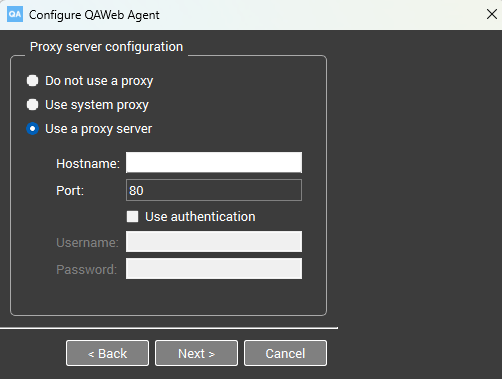
Run the configurator application on your workstation (C:\ProgramFiles\Barco\QAWeb\Configurator.exe).
-
Reconfigure the proxy settings, entering the correct proxy credentials.
-
Confirm that the connection to the cloud is restored.
-
Important Notes
-
If you continue to experience issues after reconfiguring the proxy, contact your IT support or service team (KB6024).

