
What Are the Two Driver Package Types
Barco distributes its display drivers in two variants to comply with international medical device regulations:
1. CORE DRIVER PACKAGE
The Core package contains:
- The base display driver
- All non‑regulated Intuitive Workflow Tools (IWT)
These tools do not require medical-device regulatory approval and can be distributed globally.
Included tools typically:
- VirtualView
- DimView
- FindCursor
- SmartCursor
- SingleView
- User Profiles
- Conference CloneView
- Screenshot
- Touchpad
2. DIAGNOSTIC DRIVER PACKAGE
The Diagnostic Driver Package includes ALL features available in the Core version, plus the following Intuitive Workflow Tools, which are classified as medical devices and are available ONLY in the Diagnostic version:
- Application Appearance Manager (AAM)
- SpotView
- I‑Luminate
- FilmClip
- Plugins
The Diagnostic version is available only in countries where medical device registration is completed. In countries where it is not yet approved, only the Core version is available.
How to Ensure the Correct MXRT Driver Package Is Downloaded
To ensure the correct MXRT driver package is downloaded (Core or Diagnostic), users must verify the country setting on the Barco website before downloading the driver.
Steps:
- Go to the Barco support website.
- Make sure the country/region selection is set to the country where the system will be installed.
- Navigate to the MXRT driver download section.
-
- If the Diagnostic driver package is available for download, medical device registration is completed in that country, and the Diagnostic package can be used.
- If the Diagnostic package is not shown, only the Core driver package is approved and available for that country.
The availability of the Diagnostic package is automatically controlled based on local regulatory approval.
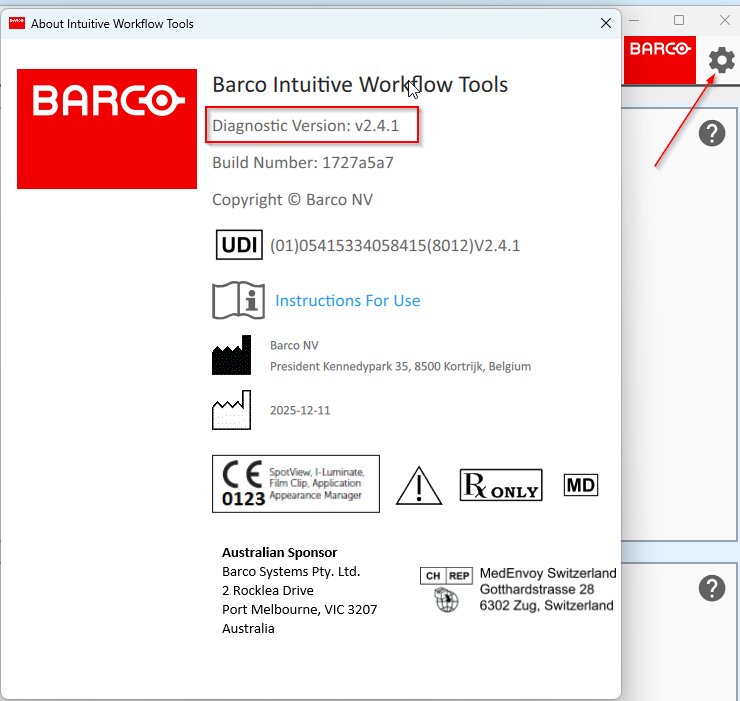
How to Check Your Installed IWT Version
- Open Barco System Settings from the desktop
- Click the gear icon (⚙)
- Select About Intuitive Workflow Tools
This screen will show whether the installed package is Core or Diagnostic.
IWT Feature Matrix
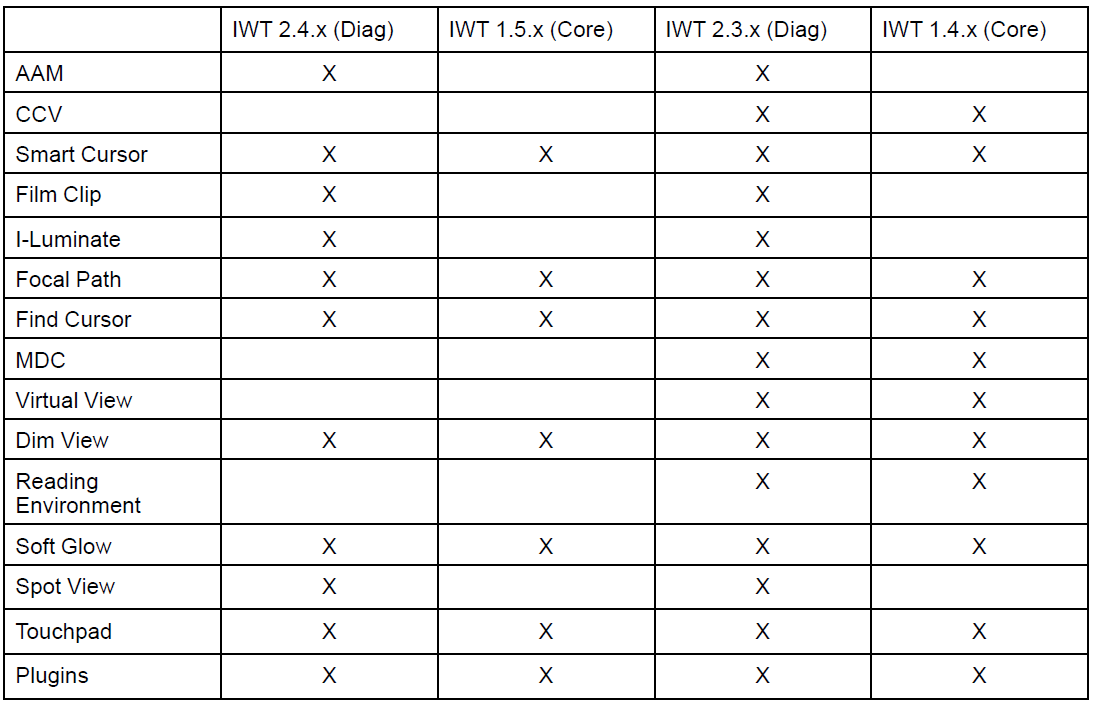
The following table shows which tools are available in different IWT generations.
IWT 2.3.x (Diag) and 1.4.x (Core) are now in sustaining mode --> Barco SW Pkg 2025.2 and above.
IWT 2.4.x (Diag) and 1.5.x (Core) are based on new software architecture --> Barco SW Pkg v11.0 and above.
Why Tools May Disappear After an Upgrade
If a system previously had a Diagnostic package, but the newly installed driver is Core-only, the regulated tools will disappear.
This occurs when:
- The Diagnostic version is not approved in that region.
- Only the Core release is available on the download page.
- The tools are no longer available in the newer software version (see the IWT Feature Matrix above for tool availability per version).
In these cases, the tools are intentionally not installed or exposed, to ensure regulatory compliance.
How to Restore Missing Tools
To recover regulated workflow tools:
- Install the Diagnostic driver package (if approved in your region), or
- Contact Barco Healthcare Service to confirm availability
Downgrading to older drivers is not recommended unless explicitly requested by Barco Support.

