
Deutsche Text Version:
Problembeschreibung:
Es wurde in manchen Fällen festgestellt, dass in QAWeb DIN 6868-157 während einer DICOM-Konformitätsprüfung im Rahmen eines halbjährlichen Konstanzprüfung der interne Sensor zu einem bestimmten Zeitpunkt die erforderlichen Messungen vornimmt, das Feld jedoch leer bleibt.
Der Fehler könnte wie folgt aussehen (Messungsfelder bleiben leer):
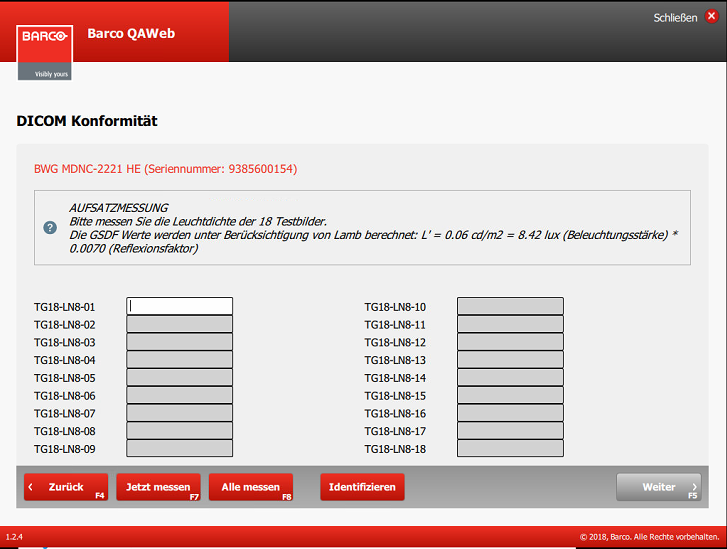
Bei dieser Problematik, kann man sich zwei Hauptfragen stellen:
- Liegt dieses Problem an einem fehlerhaften Frontsensor?
- Oder tritt dieses Problem durch einen Softwarefehler auf?
Fehlerbehebung:
Um herauszufinden, ob der interne Front Sensor des Monitors nicht mehr wie erwartet misst, empfehlen wir die Durchführung einer DICOM Konformitätsprüfung in unserer zweiten Qualitätssicherungssoftware: QAWeb Agent.
In beiden Softwareprogrammen (DIN und Agent) wird der interne Frontsensor (I-Guard) bei einer DICOM Konformitätsprüfung verwendet.
Folgendes können Sie testen:
- Öffnen Sie den QAWeb Agent (Ihre Barco-Monitore sollten per USB mit der Workstation verbunden sein)
- Wählen Sie auf der Statusseite die Dicom Konformitätsprüfung aus und klicken Sie auf Ausführen
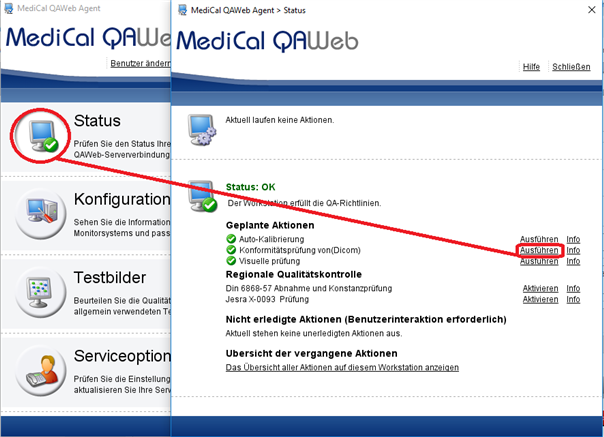
- Wenn Sie fertig sind, wählen Sie erneut die Dicom-Konformitätsprüfung aus, wählen Sie Informationen aus und sehen Sie sich das detaillierte Ergebnis an.
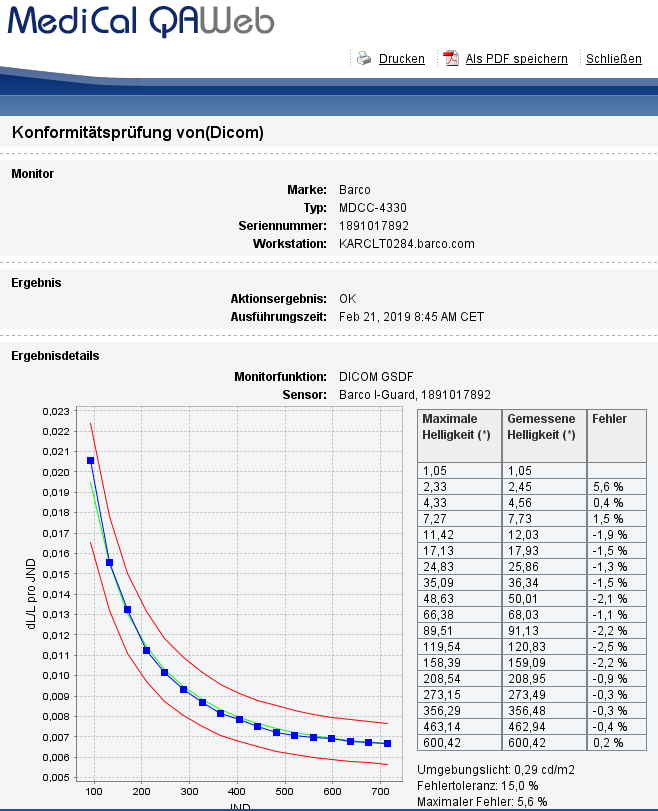
Dieses Ergebnis zeigt die 18 Messungen der DICOM GSDF-Kurve, die vom internen Sensor (I-Guard) durchgeführt wurde.
Fazit zur Fehlerbehebung:
Der Frontsensor des Monitors scheint nicht von einem Hardwareproblem betroffen zu sein, da er die Werte in der QAWeb Agent-Software messen und anzeigen kann, während die Messfelder in der QAWeb DIN-Software leer bleiben. Das Problem liegt dann eher Softwareseitig.
Grundursache:
Ein Kommunikationsfehler führt dazu, dass die QAWeb DIN Software die gemessenen Luminanzwerte nicht korrekt abruft.
Problemumgehung:
- Bitte den Barco Monitor und den Befundungsrechner vom Stromstecker ziehen und mindestens eine Minute warten bis sich alle elektronischen Komponenten entladen.
- Durch einen Neustart wird eine vollständige Aktualisierung der Kommunikationsbibliothek ausgelöst, die das Problem vorübergehend lösen kann.
- Sollte das Problem bestehen nach den Schritten 1 und 2, starten Sie bitte ein Factory Reset des Barco Monitors, siehe KB9717
English Text Version:
Problem description:
It has been noticed that sometimes, during a half-yearly constancy test within the QAWeb DIN 6868-157 software, the integrated front sensor (I-Guard) seems to perform the required measurements but the field remains empty.
The result could look like the image below:
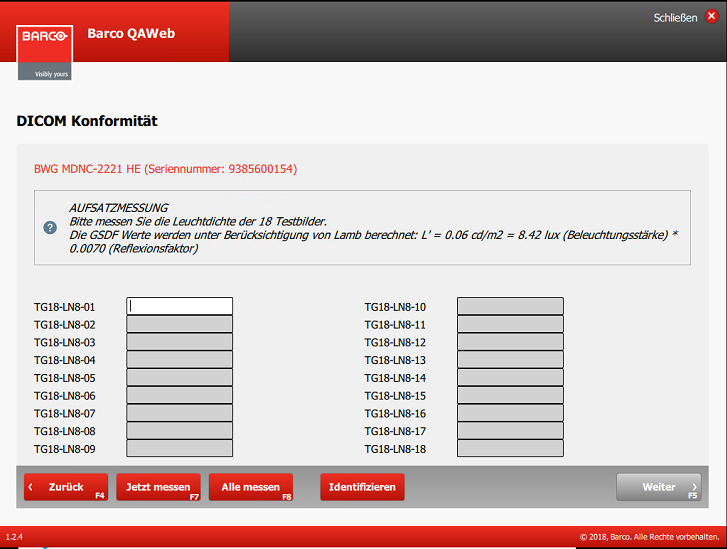
In this case, two major questions pops-up:
- Is this issue due to a faulty front sensor?
- Or does this issue occur through a software bug?
Troubleshooting:
To figure out, if the front sensor of the monitor doesn't measure as expected anymore, we suggest to perform a DICOM Compliance Check within our second quality assurance software: QAWeb Agent.
Indeed, in both software programs (DIN and Agent), when a DICOM Compliance Check occurs, the internal front sensor (I-Guard) is used to perform the DICOM GSDF measurement test.
To Do:
- Open QAWeb Agent (your Barco monitors should be connected via USB to the workstation)
- On the Status Page, select the Dicom Compliance Check test and click on Run
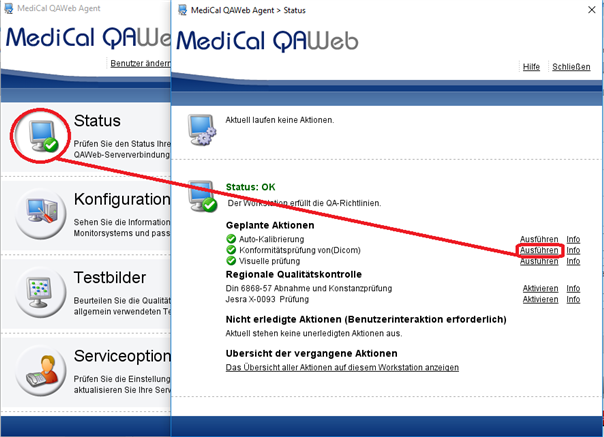
- Once done, select again the Dicom Compliance Check, select info and look at the detailed result.
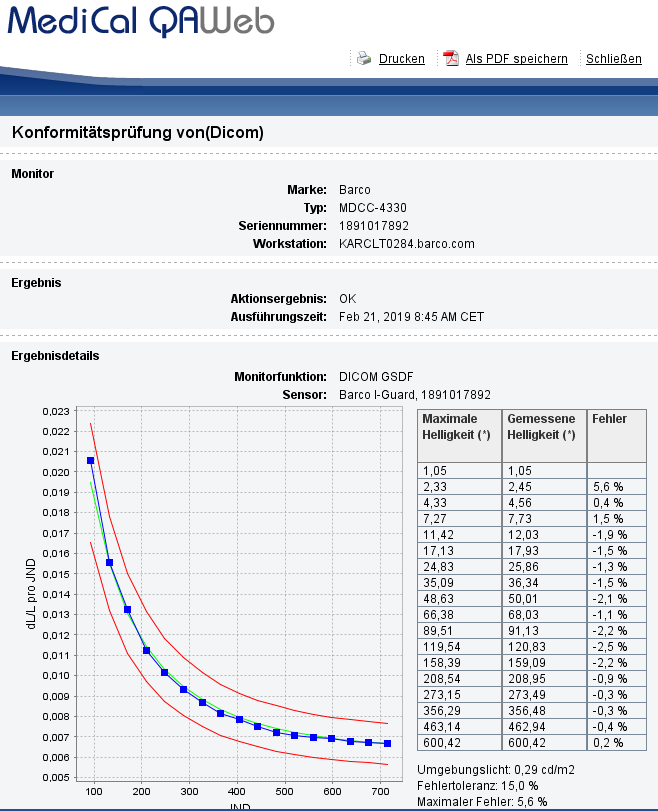
This result shows the 18 measurements of the DICOM GSDF Curve performed by the internal sensor (I-Guard).
Troubleshooting conclusion:
The Front Sensor of the monitor seems not to be impacted by a hardware issue as it could measure and display the values in the QAWeb Agent software while the measurements fields remain empty in the QAWeb DIN Software. So the problem seems to be rather software related.
Root cause:
A communication error causes the QAWeb DIN Software to not fetch correctly the measured luminance values.
Workaround:
- Please unplug the Barco monitor and the diagnostic computer and wait at least one minute until all electronic components discharge.
- A restart will trigger a complete update of the communication library, which may temporarily solve the problem.
- Should the problem persist after step 1 and 2, please try to perform a Factory Reset of the Barco Monitor as described in KB9717

