
Barco search

myBarco notifications

Unread

Read

You don't have any notifications.

Theater mode in ClickShare C-series, CX-series and Bar Core/Pro

Article number: [3297] - Legacy code: [12102]

Applicable to

When Theater mode is enabled in the ClickShare Configurator (Personalisation > On-Screen ID), the black status bar at the bottom disappears when content is shared, only appears when notifications (i.e. status changes, notifications, pin-code, etc...) are to be shown.

With touchscreens, a "tag" allows you to display the status bar to start annotation and blackboarding.
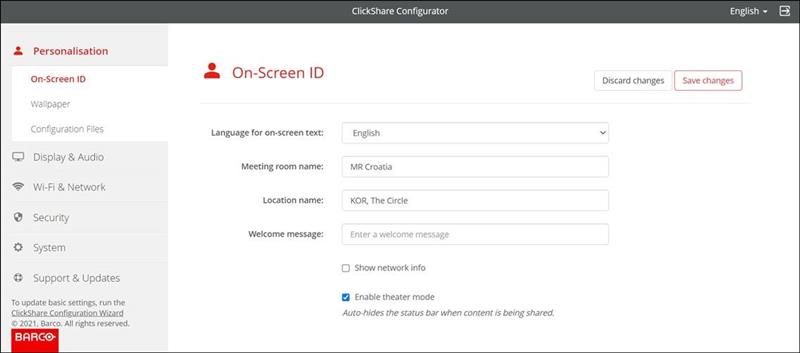
Note: Enabling Theater mode cannot remove the black status bar on the ClickShare Conference wallpaper, see KB3991 for details.

Video tutorial:
The following video demonstrates how to enable and use the Theater mode.

Related Articles

Properties

Last updated Sep 7, 2026

No solution found?

Log a support ticket

  • Technical questions
  • Return Material Authorization (RMA)
  • Status tracking of pending service requests
  • Consumable and spare parts orders

Barco AI assistant (Beta)

Our AI Assistant gives you immediate access to the full depth of our support knowledge—FAQs, detailed guides, and comprehensive PDF manuals.

Phone & email support

Our helpdesk provides you with prompt phone support. A team of experienced support engineers is at your service for any professional assistance.