
Contents
- Maximum Distances
- Terminations
- Cables
- Installation Tips
- Testing and Validation
- Tips to Improve Non-Ideal Cabling
- Technical Details
- Additional Information
Maximum Distances
The maximum working distance of the HDBaseT™ (HDBT) cables used with a ClickShare USB-C Extension over CAT kit depend on the use case and the Category Type of the cable. See table below for more details.
| Use-Case | Cat 5e / Cat 6e | Cat 6a / Cat 7 |
|---|---|---|
| When connecting to the ClickShare Control Panel | 60m | 70m |
| When connecting to the laptop for wired video input | 35m | 40m |
The maximum distance assumes optimal cabling and terminations.
Terminations
Minimize them!
Signal gets lost at every keystone, coupler, and punch-down. This dramatically reduces the distances reachable with HDBaseT.
Barco recommends using only home-run cables—straight from transmitter to receiver with no keystones, couplers, or punch-downs.
Terminations wear out?
Terminations are subject to wear. Moisture and oxidation as well as thermal cycles age connection points and can reduce quality over time. Physical movement and vibration is also a factor, especially for cables mounted on articulating arms.
RJ45 Types
Avoid EZ-type connectors. These can leave the ends of pairs sticking out through the connector where they may short.
- Use ANSI/TIA-568 standard
- Must be same on both ends (straight-through)
- Must fit for the AWG of the cable (ideally, use the connectors provided with the cable)
- Use shielded RJ45 connectors
- Connect drain wire to RJ45 metal housing
- Ensure full shield continuity
Cables
Cat 5e or better
- We strongly recommend using a HDBaseT certified cable.
- Shielded Cat 6a is ideal.
- You won't see much benefit from Cat 7.
- Stranded cables dramatically reduce signal quality and distance. Barco recommends using solid cables.
- AWG (American Wire Gauge) should be max 24.
Approximate distances reachable with a given cable type and use case:
- When connecting to the ClickShare Control Panel
Cable Type Distance Cat 5e/6 60m Cat 6a/7 70m Note: These estimates assume ideal, minimal terminations!
- When connecting to the laptop for wired input source
Cable Type Distance Cat 5e/6 35m Cat 6a/7 40m Note: These estimates assume ideal, minimal terminations!
Cables wear out?
Physical motion and vibration can work-harden cables and eventually cause tiny fractures and breaks which reduce signal quality. The major source of aging and wear will be at terminations. (See Terminations – Terminations wear out?)
Installation Tips
Cable Crimping
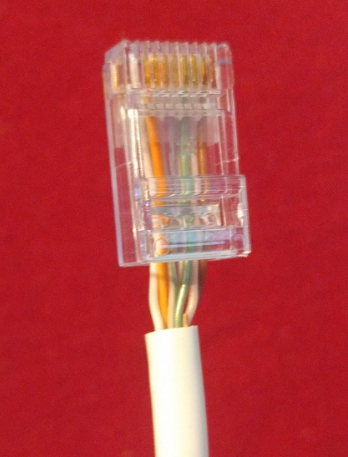
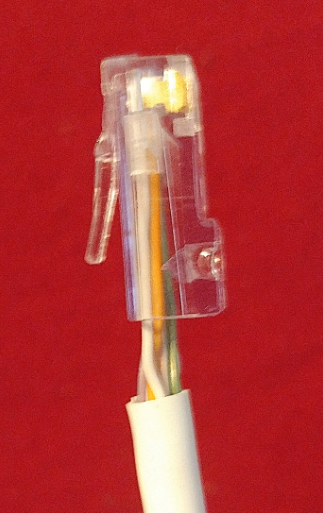
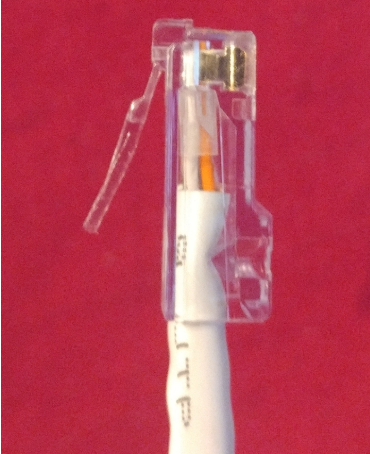
It's common to see category cables with the strain relief tab crimped into the pairs. This leaves the untwisted pairs longer than they should be which will lower the connection quality and the distance HDBaseT will be able to reach. It also makes the strain relief ineffective and causes wear on the pair insulation as the cable moves.
Bend Radius
Avoid bends that are less than 4 times the cable diameter, or approximately 1 inch.
Nail Plates
When running cables through studs, use nail plates over your notches and holes to prevent nails and screws from being driven into your cables during later phases of construction, or if your client hangs a picture later on.
Zip Ties, Bundling, Cable Management
- Zip ties aren't recommended for HDBaseT cables. It's easy to make them too tight and this will deform the twisted pairs inside the cable, reducing signal quality. Zip ties can also cut into cable jacks. Velcro is preferred.
- Nearby category cables will likely operate at the same frequency and so are a major source of interference for HDBaseT. This is called Alien Crosstalk (ANEXT). So if you have a long run that is bundled, it is recommended to use shielded cabling. This will greatly reduce ANEXT.
- Bundling can also be a concern for thermal management when PoE is being distributed through a very large bundle. Keeping bundles under 30 cables is a conservative approach. As of 2017, category cable bundling is specified in the National Electric Code Article 725.144. The max bundle size depends on the current being drawn through each cable and its wire gauge.
ESD During Cable Install
- Electrostatic Discharge can damage equipment. The HDBaseT ports of the ClickShare USB-C Extension over CAT kit include ESD protection, but every ESD incident still increases the risk of damage and all protection has limits.
- ESD can be generated when installing HDBaseT cabling. As you unwind cables, bend them, touch them, and drag them across flooring, electric charge can build up. The risk is higher in lower humidity environments.
- To minimize the risk of ESD, if a cable has been disconnected at both ends, touch one end to grounded metal before connecting. For example, to the side of a grounded rack. The metal doesn't have to short the cable. With the standard recess of the RJ45 pins, they will arc over to metal pressed against the plastic of the connector at below the ClickShare USB-C Extension over CAT kit ESD protection maximums.
- Grounded wrist straps or mats are recommended if the environment is especially prone to ESD.
Testing and Validation
HDBaseT Testers
Because HDBaseT requires a lot of bandwidth, typical cable testers cannot determine whether a cable will pass HDBaseT. Testers such as the MS-TestPro 103 and 104, as well as the QuantumData 280 are appropriate for HDBaseT testing.
Tips to Improve Non-Ideal Cabling
- It is often necessary to work with the cables already installed on a jobsite. While we can't guarantee success with such cabling, you can often improve the existing cable and HDBaseT signal quality.
- Eliminate all unnecessary connection points--punch-downs, keystones, couplers, etc.
- Re-crimp RJ45's and re-punch any connections that cannot be eliminated.
- If a splice cannot be eliminated, replace button splices and other splices with proper punch-down style couplers.
- Minimize any length of pairs that are untwisted.
Technical Details
HDBaseT – PAM-16 and Noise
- HDBaseT uses PAM-16 encoding. This means the voltage sent over your HDBaseT cables is split into 16 distinct levels. This is similar to 10 Gigabit Ethernet. For comparison, 1 Gigabit Ethernet uses only 5 voltage levels.
- Using more voltage levels to encode data means that more data can be sent and received over the link in a given time, but the tradeoff is increased sensitivity to noise. If the noise level is high enough to blur the lines between two voltage levels, bits are lost. The more voltage levels you use for encoding, the closer together those levels must be, the lower the noise tolerance.
- HDBaseT uses Forward Error Correction (FEC) to help improve tolerance to noise. This gives the signal some redundancy, but it too has limits.
Cabling – Terminations and Signal Integrity
- When it comes to high frequency signals, electricity behaves more like light. This means every interface (termination) causes the signal to scatter and reflect. Any time the signal encounters a change in the electrical properties of the material it's traveling through, signal is lost.
- An HDBaseT signal hitting a bad termination is like a ray of light hitting the surface of a swimming pool. Much of it reflects off. The transition from the copper in your cable into the RJ45 at the end of your cable is a change in electrical properties. Same for exceeding the bend radius of your cable or untwisting the pairs. This is also why we recommend minimizing terminations and splices. Even good terminations cause some loss of signal because the match in electrical properties between your termination and the cable itself is never perfect.

