Barco search

myBarco notifications

Unread

Read

You don't have any notifications.

Screen connected to the base unit shows strange behavior when the ClickShare returns from standby mode

Article number: [4237] - Legacy code: [3724]

Applicable to

We've noticed when the ClickShare Base Unit returns from standby mode, the connected screen may exhibit strange behavior. This can include the monitor not waking up, flashing, or not displaying the full content.

Solution:

In these cases, we recommend disabling the Hot Plug Display Detection (on CSC-1) or HDMI™ Hot-Plug display detection (on CS and CSE) mechanism in the ClickShare Configurator1 of the Base Unit. Alternatively, you can set the Base Unit to a fixed resolution.

  • CSC-1: Setup > Display
  • CS-100(Huddle) and CSE-200: Display & Audio > Display & Audio
  • CSE-200+ and CSE-800: Display & Audio > Outputs
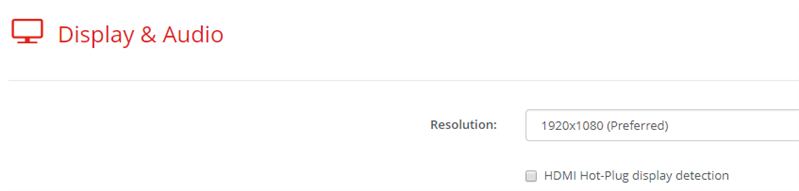
1 See KB 9653 for details on how to configure Base Unit settings through the ClickShare Configurator.

Properties

Last updated Sep 7, 2026

No solution found?

Log a support ticket

  • Technical questions
  • Return Material Authorization (RMA)
  • Status tracking of pending service requests
  • Consumable and spare parts orders

Barco AI assistant (Beta)

Our AI Assistant gives you immediate access to the full depth of our support knowledge—FAQs, detailed guides, and comprehensive PDF manuals.

Phone & email support

Our helpdesk provides you with prompt phone support. A team of experienced support engineers is at your service for any professional assistance.