
The default audio output for ClickShare devices (C-, CX-, CS-, and CSE-series) is HDMI™.
Changing the Audio Output
You can change the audio output settings in the ClickShare Configurator of the Base Unit. Here’s where to find the settings for different models:
| Model | Where to find |
| C-5 & C-10 | Display & Audio > Display & Audio > Audio output |
| CX-20 & CX-301 | Display & Audio > Display & Audio > Audio output |
| CX-501 | Display & Audio > Outputs > Audio output |
| CS-100(Huddle) & CSE-200 | Display & Audio > Display & Audio > Audio output |
| CSE-200+ & CSE-800 | Display & Audio > Outputs > Audio output |
| CSM-1 & CSC-1 | Setup > Audio |
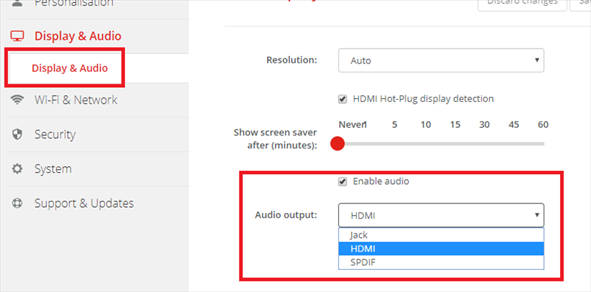
Example: Audio output settings on CSE-200
Warning: After changing the audio setting you must first repair the Button with the Base Unit and restart the ClickShare Client or ClickShare App.
Note: If you have trouble identifying your ClickShare model, see KB2865 for details.
1 For CX sound jack and HDMI™ audio on the Base Unit is un-usable in order to eliminate any chance of acoustic echo as soon as an audio Peripheral is connected to the USB. They are greyed out in the configuration interface.

