Issue
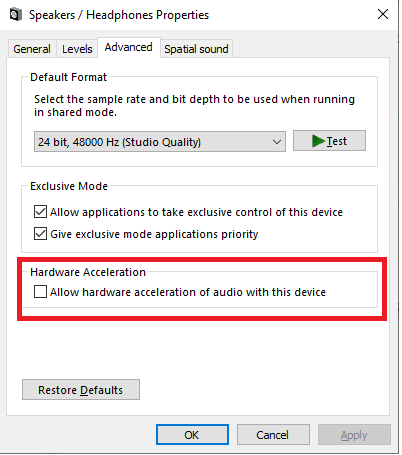
On some computers that have hardware acceleration of audio enabled, the audio is missing when sharing via the ClickShare Desktop App without plugging in a ClickShare Button.
Solutions
Upgrading your ClickShare Desktop App to version 4.19 or higher will resolve the issue.
If the problem persists, try the following solutions:
-
Deploy ClickShare Desktop App with Virtual Audio Driver:
- Use the MSI installer to deploy the ClickShare Desktop App with the Virtual Audio Driver (VAD) enabled (how-to, see KB3329).
-
Disable Audio Hardware Acceleration on your computer:
- Navigate to Windows Settings > System > Sound > Output > Device Properties > Additional Device Properties > Advanced.
- Uncheck the option Allow hardware acceleration of audio with this device.