
The ClickShare Button and ClickShare Mobile App do not support creating a virtual second (extended) desktop on macOS. However, you can achieve this using AirPlay functionality of the macOS.
To create a virtual second desktop on macOS, use AirPlay to share your screen to a ClickShare device that supports AirPlay casting.
Steps to Create a Virtual Desktop using AirPlay with ClickShare?
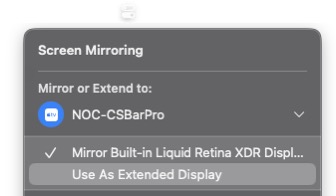
- Share Screen via AirPlay: Use AirPlay to share your macOS screen to the ClickShare Base Unit.
For detailed instructions on sharing a macOS device with ClickShare, see how-to: KB2890. - Enable Extended Display: Select the Use As Extended Display option to use the ClickShare Base Unit as a virtual second display.
Note: If you encounter any issues with this setup, please refer to Apple AirPlay support for assistance

