
When the LED ring on your ClickShare Button keeps flashing white, it indicates that the Button is still attempting to establish a connection.
Your ClickShare Button flashes white when:
- It’s trying to connect to the ClickShare Base Unit Wi‑Fi or Corporate Wi‑Fi.
- You still need to start the ClickShare application from the ClickShare drive.
- It isn’t paired correctly to the Base Unit.
- Firmware on the Button or Base Unit is outdated.
Troubleshooting steps
Follow these steps in order—they address most user problems.
Step 1: Activate the Button
When you plug in the Button, a ClickShare drive appears on your computer. Open it and run the ClickShare application stored inside.
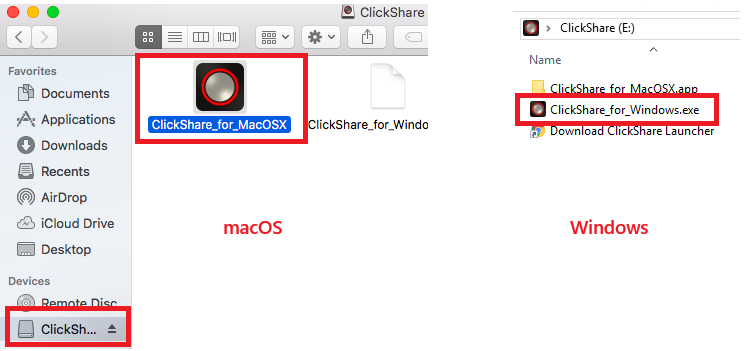
Once the app runs successfully or activated, the LED ring on your ClickShare Button should stop flashing.
Step 2: If it still flashing white: Repair the Button
Sometimes the Button has lost its pairing with the Base Unit. Please re-pair the ClickShare Button with the Base Unit (how-to, see KB5924)
Step 3: Update the Base Unit and Button firmware
Outdated firmware is a common cause of a flashing white LED on the Button. To ensure proper connectivity, verify that the Base Unit is running the latest firmware. If not, update the Base Unit and the Button to their most recent versions.
- Base Unit firmware version check: How-to, see KB13401
- Base Unit firmware update: How-to, see KB5923
- Button firmware update: How-to, see KB9769
Step 4: Check for IT blockers or restrictions
Some security tools block the ClickShare executable from running. Make sure the ClickShare App is not being blocked by security restrictions.
IT admins can whitelist the ClickShare Button or App running from the Button by following the procedure outlined in KB3527.
A useful test:
- Install and try the ClickShare Desktop App (hoe-to, see KB3714). If the Desktop App works but the Button doesn’t, your USB port or executables may be restricted.
Step 5: Contact your point of sale
If you have completed all troubleshooting steps and the Button’s LED ring continues to flash, the device may be experiencing a hardware issue or potential defect.
If the Button is still under warranty, please contact your original point of sale. who can help you get a warranty replacement.

