
By default, ClickShare Base Units always output content in a 16:9 aspect ratio. If the device, you’re sharing from uses a different aspect ratio, the image must be scaled, which results in black borders on either the top/bottom or sides of the meeting room screen.
Windows devices
- Most Windows laptops already use a 16:9 resolution, so borders are uncommon.
- Microsoft Surface devices, however, use a 3:2 aspect ratio, which causes black borders.
- To fix this, change the screen resolution: right-click the Desktop, select Screen resolution and set the resolution to 1920×1080 (16:9).
macOS devices
The default resolutions are by default in a 16:10 or 4:3 aspect ratio. For this reason, the content will be scaled to 16:9, causing black borders to appear:
- 16:10 → black bars at top/bottom
- 4:3 → black bars on left/right
Limiting black borders when sharing from macOS
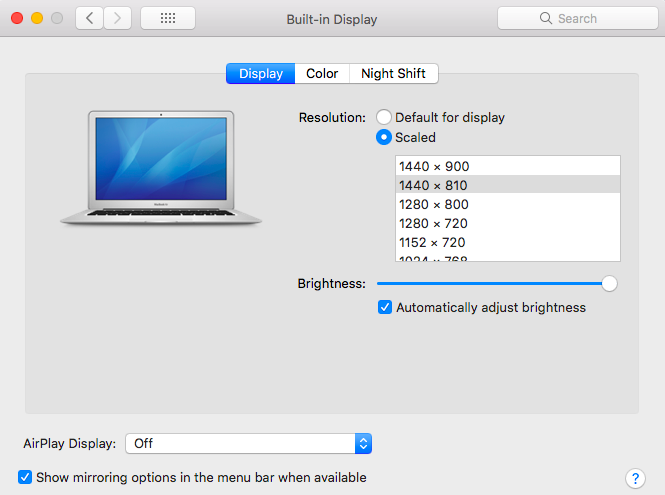
- Go to System Preferences → Displays.
- Hold Alt (Option) and click Scaled to reveal more resolutions.
- Choose a 16:9 option (e.g., 1440×810).
Note: MacBooks with a Retina display will not give you the screen below. To get a 16:9 display on a Mac with a retina display, for no black bars you will need to attach an external monitor and set that resolution to 16:9.
🔗https://support.apple.com/en-us/HT202471
Black status bar on the ClickShare models (C‑series, CX‑series, Bar Core/Pro)
On these ClickShare models, a wallpaper with a status bar is present, featuring a visible bottom bar. Due to this the content presented on the screen is scaled and result in visible black borders.
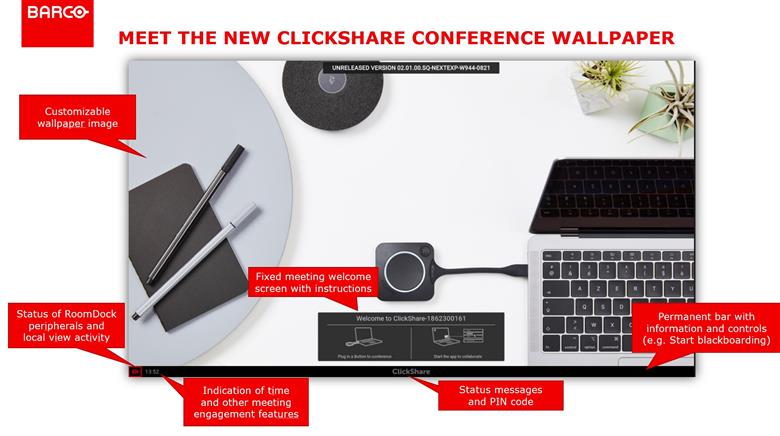
This is intentional, not an error and cannot be removed. It is used to:
- Display time, helping users manage meetings
- Show room capabilities (camera/mic icons)
- Display PIN codes and pairing info when required
- Provide controls for annotation and touchback
Hiding black status bar: You can hide the black status bar while sharing content by enabling Theater Mode in their ClickShare Configurator (how-to, see: KB3297).

