
Overview
The ClickShare Desktop App requires specific macOS permissions to support screen sharing and touchback functionality.
Without these permissions, content sharing may fail or show a black screen.
Required permission
To use the ClickShare Desktop App correctly, ensure the following permissions are enabled:
- Screen Recording (also labeled Screen & System Audio Recording in newer macOS versions) → Required for sharing your screen
- Accessibility → Required for touchback features
Enabling permissions on macOS Ventura, Sonoma and later
- Open System Settings.
- Go to Privacy & Security.
- Scroll to and select:
- Screen & System Audio Recording (or Screen Recording)
- Enable ClickShare
- Then go to:
- Accessibility
- Enable ClickShare
Enabling permissions on macOS Catalina – Monterey
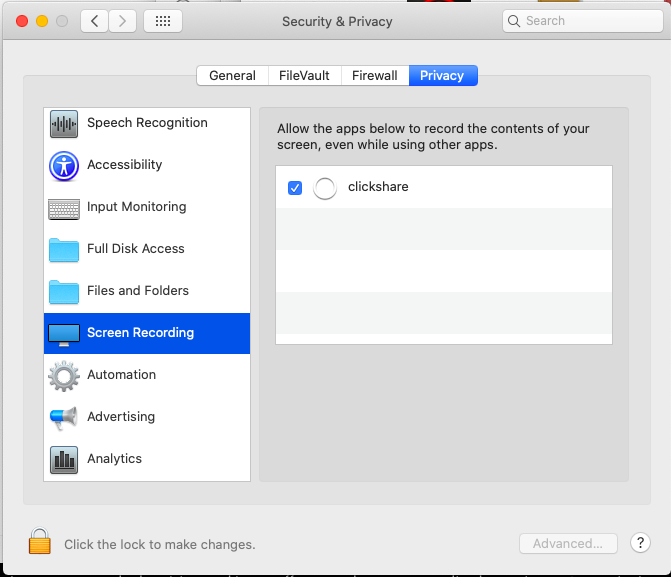
- Open your System Preferences and go to Security & Privacy.
- Select the tab Privacy.
- In the left-hand menu, select Screen Recording or Screen & System Audio Recording.
- Enable the checkbox next to ClickShare (required for screen sharing).
- In the left-hand menu, select Accessibility.
- Enable the checkbox next to ClickShare (required for Touchback).

Troubleshooting
If screen sharing does not work or does not activate immediately after enabling the permissions:
- Disable the ClickShare permission under Screen Recording and Accessibility.
- Re-enable the ClickShare permission in both locations.
- Verify that ClickShare appears in both permission lists.
If you are unable to enable the Screen Recording permission, or if the setting automatically reverts to Off, refer to KB7993 for additional troubleshooting guidance.

